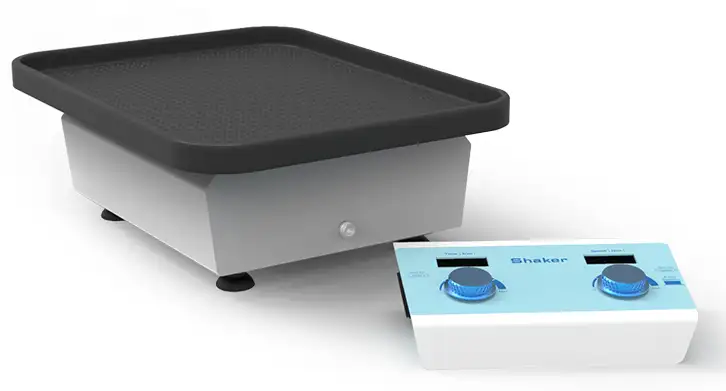
Orbital Shaker BFA1Z1 (BSOT-204)

Extreme Environment Shaker
  • Sea, Air, Door to Door Shipping
  • 1 Year Warranty
  • US & European Standards


Orbital Shaker 50~300rpm 1min~99h59min

Specifications

ModelBFA1Z1
Speed Range50~300rpm
Time Range1min~99h59min
Digital DisplayTime/speed display
Radius of gyration10mm
Max Load Capacity2.5Kgs
Motor ParametersBrushless DC motor
Platform Size330mmx430mm
Beep AlarmYes
Voltage100~240V AC 0.75A 50/60Hz
Power30W
Fuse250V,1A,φ5x20
Controller sizeW.220xD.132xH.64mm
Shaker sizeW.270xD.320xH.112mm
Net Weight8.2kgs

Description

The shaker is suitable for use in CO2 incubators, greenhouses, and refrigerators. The parameter display and controller are placed outside. There is no need to worry about humidity, high temperature and other factors affecting the performance and life of the instrument. It is very suitable for animal cell culture and suspension cell culture,and high and low temperature chemical reactions. The controller can be attached to most incubators by magnets to optimize the operating space.

Features

The controller can be placed outside the incubator, and the shaker is controlled by a ribbon cable, which is convenient for viewing and changing settings without disturbing the environment of the incubator.
The controller can be fixed on the incubator or placed on the workbench.
Suction cup machine feet, super shockproof, high speed and stable, no noise.
Large platform design, many samples can be placed, strong load-bearing capacity.

Accessories For Purchase

Images
Name
Description
ImagesNameDescriptionPlatform TS-AStainless steel platformand rubber mat combinationConical Flask Stand TS-B250ml can put
Platform TS-A
Stainless steel platform
and rubber mat combination
ImagesNameDescriptionPlatform TS-AStainless steel platformand rubber mat combinationConical Flask Stand TS-B250ml can put
Conical Flask Stand TS-B
250ml can put 12pcs
ImagesNameDescriptionPlatform TS-AStainless steel platformand rubber mat combinationConical Flask Stand TS-B250ml can put
Conical Flask Stand TS-C
100ml can put 20pcs
ImagesNameDescriptionPlatform TS-AStainless steel platformand rubber mat combinationConical Flask Stand TS-B250ml can put
Universal Platform TS-D

Photos

BSOT-204BSOT-204BSOT-204BSOT-204BSOT-204BSOT-204

Operating Manual

Download


Chapter 1 Introduction
Chapter 2 Specifications
    1. The Normal Operation Condition
    2. The Basic Parameters and Specifications
Chapter 3 Preparation
    1. Structure Description
    2. Keyboard and Display Panel
    3. Key Function
    4. Power Connection
    5. Platform Installation
Chapter 4 Operation Guide
    1. Speed and Timing Setting
    2. Stop / Start
    3. Alarm
Chapter 5 Failure Analysis and Troubleshooting
Appendix A:Wiring Diagram of Extreme Environment Shaker

Chapter 1 Introduction

BSOT-204 shaker is suitable for use in CO2 incubators, greenhouses, and refrigerators. The parameter display and controller are placed outside. There is no need to worry about humidity, high temperature and other factors affecting the performance and life of the instrument. It is very suitable for animal cell culture and suspension cell culture and high and low temperature chemical reactions. The controller can be attached to most incubators by magnets to optimize the operating space.

Features:

- The controller can be placed outside the incubator, and the shaker is controlled by a ribbon cable, which is convenient for viewing and changing settings without disturbing the environment of the incubator.

- The controller can be fixed on the incubator or placed on the workbench.

- Suction cup machine feet, super shockproof, high speed and stable, no noise.

- Large platform design, many samples can be placed, strong load-bearing capacity.

Chapter 2 Specifications

1. The Normal Operation Condition

Can be used in CO2 environment, incubator or cold room Operating environment temperature (shaker): -10 ~ 60°C Operating environment temperature (controller): -10 ~ 50°C

Relative Humidity: 100%

Power: AC110V/220V50/60Hz ,50/60HZ

2. The Basic Parameters and Specifications

Model

BSOT-204

Speed Range

50~300 rpm

Time Range

1min~99h59min

Digital Display

Time/speed display

Radius of gyration

10mm

Max Load Capacity

2.5Kgs

Motor Parameters

Brushless DC motor

Platform Size

330mmx430mm

Beep Alarm

Yes

Voltage

100~240V AC 0.75A 50/60Hz

Power

30W

Fuse

250V,1A,φ5x20

Controller size

W.220xD.132xH.57mm

Shaker size

W.270xD.320xH.88.5mm

Net Weight

8kgs

Chapter 3 Preparation

This chapter mainly describes the instrument's mechanical structure, the keyboard and functions of each key, as well as preparations before power on. Please learn this chapter well before the Extreme Environment Shaker is to be operated at the first time.

1. Structure Description

Tags:, Description:, Attributes-End, BSOT-204 shaker is suitable for use in CO2 incubators, greenhouses, and refrigerators.

2. Keyboard and Display Panel

Tags:, Description:, Attributes-End, BSOT-204 shaker is suitable for use in CO2 incubators, greenhouses, and refrigerators.

3. Key Function

Tags:, Description:, Attributes-End, BSOT-204 shaker is suitable for use in CO2 incubators, greenhouses, and refrigerators. Left side: Rotate the knob to the right, the time increases. Rotating to the left is the opposite.

Tags:, Description:, Attributes-End, BSOT-204 shaker is suitable for use in CO2 incubators, greenhouses, and refrigerators. Right side: Rotate the knob to the right to increase the speed. Rotation to the left reduces the speed.

Press the knob and the instrument starts to run, and press the knob again to stop the instrument.

4. Power Connection

Put the instrument on a horizontal and even working table, insert the cylindrical socket of the power cord into the power input socket on the back of the instrument as shown in the figure, and connect the other end of the power cord to the grid. The grid voltage is required to be within the range of AC100~240V.

Tags:, Description:, Attributes-End, BSOT-204 shaker is suitable for use in CO2 incubators, greenhouses, and refrigerators.

5. Platform Installation

The Extreme Environment Shaker can be equipped with four type of platforms: Platform A, Platform B, Platform C, Platform D.

Tags:, Description:, Attributes-End, BSOT-204 shaker is suitable for use in CO2 incubators, greenhouses, and refrigerators. Platform Platform A (Stainless steel platform and rubber pad combination)

Tags:, Description:, Attributes-End, BSOT-204 shaker is suitable for use in CO2 incubators, greenhouses, and refrigerators. Erlenmeyer flask platform Platform B (250ml can hold 12)

Tags:, Description:, Attributes-End, BSOT-204 shaker is suitable for use in CO2 incubators, greenhouses, and refrigerators. Erlenmeyer flask platform Platform C (100ml can hold 20)

Tags:, Description:, Attributes-End, BSOT-204 shaker is suitable for use in CO2 incubators, greenhouses, and refrigerators. Universal platform Platform D


Platform installation steps:

Platform installation steps:, 1. Remove the rubber pads on the, 2. Fix the platform on the host with four screws., 3. Then

1. Remove the rubber pads on the

2. Fix the platform on the host with four screws.

3. Then put the non-slip back on the platform.

Chapter 4 Operation Guide

1. Speed and Timing Setting

Platform installation steps:, 1. Remove the rubber pads on the, 2. Fix the platform on the host with four screws., 3. Then - Turn on the power switch, the instrument enters initialization, the display screen is as shown on the right, accompanied by a beep sound.

Platform installation steps:, 1. Remove the rubber pads on the, 2. Fix the platform on the host with four screws., 3. Then - Speed setting: Image 130, PictureTurn the right knob to set the speed value immediately. After you stop turning the knob, the instrument automatically confirms the implementation of the new set value and saves the set value. As shown on the right. To increase the modification range, turn the knob quickly. As shown on the right, it is 300.

Platform installation steps:, 1. Remove the rubber pads on the, 2. Fix the platform on the host with four screws., 3. Then - Time setting: Image 131, PictureTurn the left knob to set the time immediately. After you stop turning the knob, the instrument automatically confirms the execution of the new set value and saves the set value. As shown on the right. To increase the modification range, turn the knob quickly. As shown in the figure on the right, it is 8:56. When the operation ends, there will be a buzzer prompt.

NOTICE: When the time is set to 00:00, it means the running timing is ∞.

2. Stop / Start

- Short press the right knob to run the current program. When the timing ends, the operation stops, and the buzzer sounds an alarm.

- After running, the instrument displays OVER, press any key or turn the knob to enter the standby interface.

- During operation, short press the knob on the right side to stop the operation. Press this key again to restart the operation.

3. Alarm

- During operation, the communication line is disconnected, Err is displayed, and the buzzer alarms.

- When the operation is over, OVER is displayed. When the motor speed drops, the communication line is disconnected, Err is displayed, and the buzzer alarms.

- Press any key to restore the display.

Chapter 5 Failure Analysis and Troubleshooting

Failure Analysis and Processing Procedures

No.

Phenomenon

Possible Causes

Processing Procedure

1

No signal display when power on.

No power

Check the power

Broken switch

Exchange the switch

Others

Contact with the seller

2

Shaking heavily

Samples placed imbalanced

Place the samples evenly

3

Actual speed and displayed speed are not matching

Broken controller

Contact with the seller

4

Err displays

Speed out of control

Contact with the seller

5

Knob does not work

Broken button

Contact with the seller

Appendix A:Wiring Diagram of Extreme Environment Shaker

(Below diagram is just for reference. It is subject to change without prior notice.)

Platform installation steps:, 1. Remove the rubber pads on the, 2. Fix the platform on the host with four screws., 3. Then


Request Quote
Name*:
Email*:
I am *: Distributor End User Others
WhatsApp :
Product :
Subject :
Message :