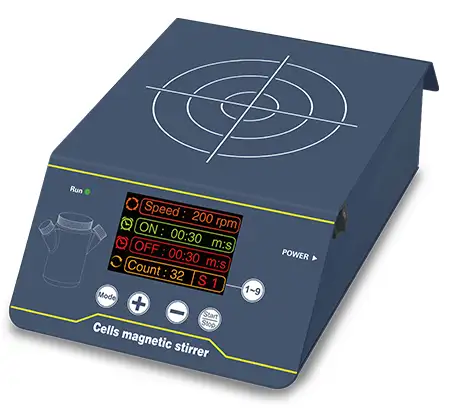
Magnetic Stirrer BFA1CR1 (BMGS-104)

Cell Magnetic Stirrer
  • Sea, Air, Door to Door Shipping
  • 1 Year Warranty
  • US & European Standards


Magnetic Stirrer 1 3L

Specifications

ModelBFA1CR1
Stirring Point Quantity1
Max. Stir Capacity3L
Speed Range5~200rpm, step:1 rpm
Platform Materialstainless steel
DimensionW.180xD.283xH.88mm
VoltageAC 100~240V, 50/60Hz
Net weight2.2kgs

Description

Cell Magnetic Stirrer is designed for research universities, laboratories and factories, used to culture and stir cells.

Features

The shell is made of stainless steel, high strength, high temperature resistance and anti-corrosion.
TFT-LCD displays speed, starting time & end time, cycle numbers and programing segments.
DC brushless motor makes stable operation, low noise, long using life.
Various working modes, including fixed speed stirring and cycle stirring.
Programmable. It can store and memorize nine frequently used settings S1~S9. One key to switch.
The control panel designed 30°slopes for convenient operation.
Magnetic stirring technology, stable running. Specially designed for cell culture with low speed.
Accelerate and decelerate gradually with low shear, keep cells growing safely.

Photos

BMGS-104BMGS-104BMGS-104BMGS-104

Operating Manual

Download


1 Introduction
2 Specifications
    2.1 The Normal Operation Condition
    2.2 The Basic Parameters and Specifications
3. Preparation
    3.1 Structure Description
    3.2 Keyboard and Display Panel
    3.3 Key Function
    3.4 Power Connection
4. Operation Guide
    4.1 Speed, time, cycle times and selection of preset Settings
    4.2 Stop / Start
5. Failure Analysis and Trouble Shooting
Appendix A:Wiring Diagram of BFA1CR1

1 Introduction

Our cell magnetic stirrer interface is user-friendly, uses ultra-low speed, ultra-quiet magnetic drive to simulate the dynamic process of cell fermentation tank. By mixing and stirring to improve the fluidity of the liquid and promote the gas exchange, can increase the flow of the culture fluid around the suspension cells and the adherence of the adherent cells to the microcarriers, effectively promote the cell growth while providing the minimum shear force. Very suitable for suspended cells, adherent microcarriers in high-density culture, accurate and uniform speed, is conducive to the balanced growth of cells.

Features:

1. Using 3.5-inch color screen as a display interface, friendly visual interface, allowing users to more intuitive operation;

2. Adopt stepping motor, stable performance, precise control, long life, excellent starting and stopping response;

3. Stainless steel sheet metal shell, high strength, high temperature, anti-rust, anti-corrosion;

4. Machine design compact, 50 ° bevel control panel for seated and standing point of view;

5. This magnetic stirrer can realize intermittent circulation work mode.

2 Specifications

2.1 The Normal Operation Condition

Ambient Temperature: 5°C ~40°C

Relative Humidity: ≤70%

Power: AC100-230V~ 1A

2.2 The Basic Parameters and Specifications

Type

Parameter

BFA1CR1

Motor type

stepping motor

Motor input power

12W

Voltage

AC100-240V

Frequency

50/60Hz

Fuse

250V 1A Ø5*20

Quantity of Stirrer Point

1 point

Maximum applicable culture bottle specification

3 L

Speed Range

5-200rpm

Interface display

3.5-inch color screen

Timing range

0s 99min59s

Dimension (WxDxH)

180*283*88 mm

Net Weight

1.8 kgs

Allowable ambient temp.

5°C-40°C

Allowable relative humidity

≤70%

3. Preparation

This chapter mainly describes the instrument's mechanical structure, the keyboard and functions of each key, as well as preparations before power on. Please learn this chapter well before the orbital shaker is to be operated at the first time.

3.1 Structure Description

Tags:, Description:, Attributes-End, Our cell magnetic stirrer interface is user-friendly, uses ultra-low speed, ultra-quiet

Tags:, Description:, Attributes-End, Our cell magnetic stirrer interface is user-friendly, uses ultra-low speed, ultra-quiet

3.2 Keyboard and Display Panel

Tags:, Description:, Attributes-End, Our cell magnetic stirrer interface is user-friendly, uses ultra-low speed, ultra-quiet

3.3 Key Function

-Increase the number of settings Tags:, Description:, Attributes-End, Our cell magnetic stirrer interface is user-friendly, uses ultra-low speed, ultra-quiet

-Decrease the number of settings

-Start/Stop key. After the speed and time setting is completed, press this key to start running. During operation, continue to press this key for 2 seconds to stop the operation.

-Parameter setting switch button

-Selection of preset Settings

3.4 Power Connection

Put the instrument on a horizontal and even working table. Connect power as below figure. DC socket is on the rear part of the instrument. Voltage should be between 100V and 240V.

Tags:, Description:, Attributes-End, Our cell magnetic stirrer interface is user-friendly, uses ultra-low speed, ultra-quiet

AC100-240V Tags:, Description:, Attributes-End, Our cell magnetic stirrer interface is user-friendly, uses ultra-low speed, ultra-quiet

4. Operation Guide

4.1 Speed, time, cycle times and selection of preset Settings

a) Turn on the power switch, the display will show the user interface, which is the last running parameter setting before the machine is turned off. Tags:, Description:, Attributes-End, Our cell magnetic stirrer interface is user-friendly, uses ultra-low speed, ultra-quiet

b) Press "MODE" button once, a white frame will be displayed at the periphery of the upper right picture. At this time, the speed can be set. Press the "+" key to increase the speed (short press is a single digit increment, if long press, the first 6S is incremented by one digit, 6S later, it is incremented by tens digit until the maximum speed is 200rpm). Pressing the "-" key decreases the speed (The same rules as "+") and the speed range is 5 ~ 200rpm. For example: change the speed from 200rpm to 100rpm, just let the periphery of the upper right picture show a white frame, and then press the "-" key to make the number 200 become 100.

c) Press "MODE" button twice, the white frame will be displayed on the periphery of the upper right picture. At this time, the running time can be set. Press the "+" key to increase the time (short press is incremented by 1 second, If long press, the first 6S is 1 second increments, 6S ~ 10S is incremented by 10 seconds, 10S later is incremented by 1 minute until 99 minutes and 59 seconds), press the "-" key, the time decreases (the same rules as the "+" ), The time range 1S ~ 99min59S. For example, change the running time from 30s to 2min20s, just let the periphery of the upper right picture show a white frame and press the "+" key to change the number 30 to 220. Tags:, Description:, Attributes-End, Our cell magnetic stirrer interface is user-friendly, uses ultra-low speed, ultra-quiet

d) Press "MODE" button three times, a white frame will be displayed at the periphery of theupper right picture. At this time, the stop time can be set (the setting method is the same as the operation time setting method), and the time range is 0S ~ 99min59s. For example, change the stop time from 30s to 1min20s, just let the periphery of the upper right picture show a white frame and press the "+" key to change the number 30 to 120. Tags:, Description:, Attributes-End, Our cell magnetic stirrer interface is user-friendly, uses ultra-low speed, ultra-quiet

e) Press "MODE" key four times, the white frame will be displayed on the periphery of the upper right picture. At this time, the number of cycles can be set. Press the "+" key to increase the number of cycles, press the "-" key, the number of cycles decreases, the cycle times range from 1 to 99 times. For example, change the number of cycles from 32 times to 20 times. Just let the outer box of the upper right picture display a white box and press the "-" key to change the number 32 to 20.

f) Press "1 ~ 9" keys, on the right site of the displayed number of cycles, the S1 that displayed will change accordingly. the display of S1 will change, preset settings from S1 ~ S9. For example: change the preset setting from S1 to S9, press "1 ~ 9" key to change S1 to S9. (Note: in the operation of the device, press the "+" or "-" can adjust speed, the final value will be saved as the setting speed)

4.2 Stop / Start

a) Press Press the START/STOP button once, can run the current program. After the timing is over, stop running.

(Note: When the motor is accelerating or decelerating, the indicator light flashing, to achieve the set speed keep normally on, the indicator light will be off when there is no speed.)

b) At the end of the operation, the instrument waits for the instructions at the end interface. At this time, press MODE or 1 ~ 9 button to reset the speed, time, cycle number or other pre-stored settings; Press the START / STOP button directly to start the program according to the previously set speed and time parameters.

c) When During operation, press the START / STOP button to stop the instrument. Press again to restart operation.

5. Failure Analysis and Trouble Shooting

Failure Analysis and Processing Procedures

No.

Phenomenon

Possible Causes

Processing Procedure

1

No signal display when power on.

No power

Check the power

Broken switch

Exchange the switch

Others

Contact with the seller

2

Shaking heavily

Samples placed imbalanced

Place the samples evenly

3

Actual speed and displayed speed are not matching

Broken controller

Contact with the seller

4

Err displays

Speed out of control

Contact with the seller

Appendix A:Wiring Diagram of BFA1CR1

(Below diagram is just for reference. It is subject to change without prior notice.)

Tags:, Description:, Attributes-End, Our cell magnetic stirrer interface is user-friendly, uses ultra-low speed, ultra-quiet


Request Quote
Name*:
Email*:
I am *: Distributor End User Others
WhatsApp :
Product :
Subject :
Message :