


Laboratory Low Speed Centrifuge BFH1BF1 (BCFL-203)
Crude Oil Testing Centrifuge- Sea, Air, Door to Door Shipping
- 1 Year Warranty
- US & European Standards

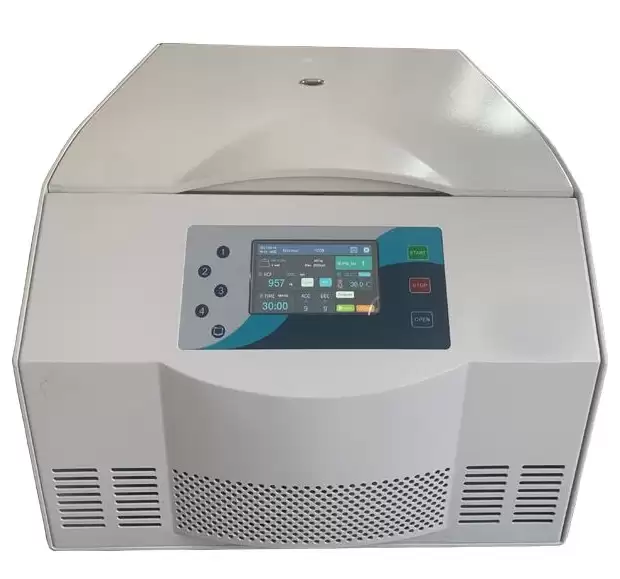
Specifications
| Model | BFH1BF1 |
| Max. Speed | 4000rpm |
| Max. RCF | 3830xg |
| Max. Capacity | 4x100ml |
| Time Range | 0~99min59sec |
| Noise | ≤ 60dBA |
| Speed Accuracy | ± 20r/min |
| Size (W x D x Hmm) | 685x500x405mm |
| Net Weight(Kg) | 67KG |
| Temperature Range | Room temperature +10~80°C |
| Package | Wooden box |
Features
1. Programmable microprocessor control system, big LCD display in rotor No., speed, time, temperature, RCF, rate of speed as well as fault information.2. Adopts band heater, fast heating speed, temperature uniform, with the function of temperature-control and constant.
3. Centrifugal tube made in special skill, anti-broken when work.
4. Great toque brushless frequency motor, maintenance-free, no powder, fast
acceleration and deceleration, low noise, which improve the stability a lot.
5. Electric lid lock, over-speed and over-temperature protection
6. 3 phase to keep the best performance.
7. Stainless steel chamber, safe and reliable
Operating Manual
DownloadSafety Notices
1. Introduction
1.1 Application and Features
1.2 Main technical parameters :
1.3 Rotor information
2. Selecting Centrifugation Parameters
2.1 Principle of Centrifugal Separation
2.2 Calculation of Centrifugal Force
3. Structural Features
4. Unpacking the Instrument
5. Installation
6. Operation and Usage
7. Other Functions
7.1 System Settings
7.2 Protection Functions
7.3 Protection for Samples During Power Failure
7.4 Changing Parameters During Operation
7.5 Memory Function
8. Trouble-shooting service
9. Other Precautions
10. Warranty Policy
Safety Notices
Welcome to the use of our equipment. Please pay close attention to the following points while operating this instrument to prevent safety incidents:
1. Disconnect the Main Power Supply: If the machine is unused for an extended period or undergoing maintenance, disconnect the main power plug. Otherwise, the instrument will remain electrically active. This machine operates on a single-phase AC power supply of 220V.
2. Avoid Imbalance in Rotor Weight: It is strictly prohibited to operate the rotor with significant weight discrepancies or in an unbalanced state.
3. Do Not Exceed Maximum Rotor Speed: Operating the rotor beyond its designated maximum speed is strictly forbidden, as it may result in severe accidents.
4. Prohibit the Use of Damaged Components: Do not use the rotor body or suspension cups if cracks are detected, as they may lead to catastrophic failure.
Thank you!
1. Introduction
BCFL-203 Benchtop Low Speed Centrifuge is an ideal centrifugal instrument widely used in laboratory, factory and etc.
1.1 Application and Features
The BCFL-203 centrifuge can be equipped with many kinds of rotor, fully meet the requirement of scientific research experiment. It is the usual instrument for separating and producing.
It is a highly intelligent instrument with brushless motor drive, micro-processing control, touch-button panel and LCD display, and integrated safety protection system. The instrument runs smoothly, has low noise, simple operation, convenient use, safety and reliability, and is widely used by scientific research units, and is well received by users.
1.2 Main technical parameters :
Max speed: | 4000rpm | Max RCF: | 3200xg |
Max volume: | 4x100ml | Noise: | ≤65dBA |
Timer: | 1~99h59min59sec | Net weight: | 67KG |
Dimension(LxWxH): | 695x500x390mm | Power supply: | AC220V/50HZ 10A |
Temperature Range : | Room Temperature+10~90°C | Speed accuracy: | ±20rpm |
1.3 Rotor information
Rotor No. | Rotor type | Max speed (rpm) | Max Volume (ml) | Max RCF (g) | Centrifugal Radius(mm) |
05237 | Swing rotor | 2000 | 4x100ml | 957 | 213.8 |
05218 | Swing rotor body | ||||
05631 | Swing rotor | 4000 | 4x8x10/15ml | 3200 | 179 |
05632 | Swing rotor | 4000 | 4x6x10/15ml | 3200 | 179 |
05633 | Swing rotor | 4000 | 4x4x10/15ml | 3200 | 179 |
2. Selecting Centrifugation Parameters
2.1 Principle of Centrifugal Separation
During operation, the instrument generates centrifugal force. This force causes sedimentation, where substances suspended in the liquid form precipitates. Heavier substances move toward the outermost radius of the rotor, while lighter substances settle above the heavier ones, resulting in a stratified separation based on density differences.
2.2 Calculation of Centrifugal Force
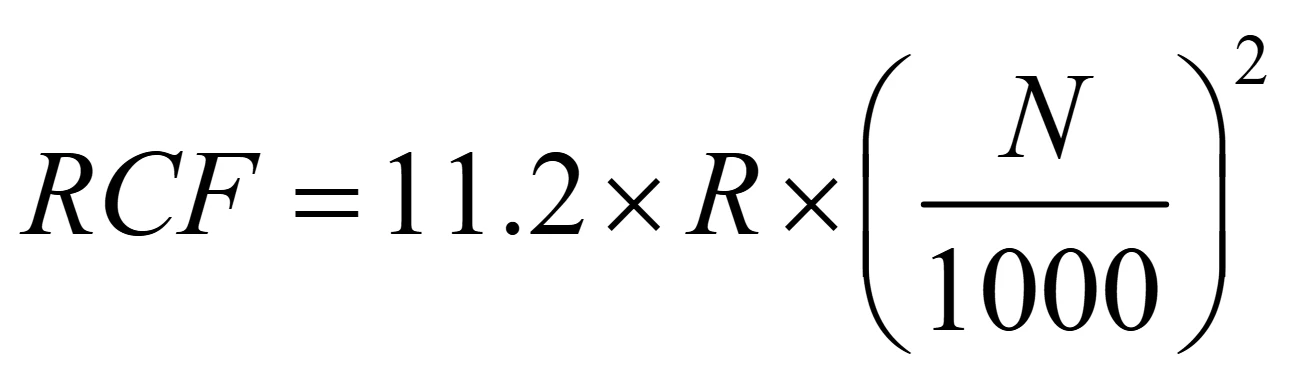
Separation is determined by the Relative Centrifugal Force (RCF), which is influenced by the rotor speed ( N ) (r/min) and the centrifugal radius ( R ) (cm). The formula for calculating RCF is as follows:
The conversion coefficient 1.12 is derived from gravitational acceleration (1g=9.81m/s2)) as an approximate factor, making the result a product of the value and gravitational acceleration.
2.3 Determination of Centrifugation Time
- For the same centrifugal force, centrifugation time is inversely proportional to the density difference of the substances being separated in the test liquid. Denser substances require shorter separation times, while lighter substances require longer times.
- For the same substance, centrifugation time is inversely proportional to the centrifugal force. Higher centrifugal force shortens the separation time, while lower centrifugal force lengthens it.
- Centrifugation time is also related to the minimum centrifugal radius. Longer baskets (test bottles) require longer centrifugation times.
Since separation time is difficult to calculate precisely, it is generally determined through experimentation.
3. Structural Features
This instrument is designed with user-friendliness in mind. The speed and time are displayed on an LCD screen, and the structure is simple and easy to use. It features an electronic door lock that is sturdy and reliable, ensuring safe operation. It complies with the national standards GB4793.7-2001 and TEC61010-Z-D20:1992.
Key safety features include:
- Triple Steel Safety Layers: The instrument is equipped with three steel protective layers for enhanced safety.
- Electronic Door Lock: The instrument will not start unless the door is properly closed and locked. While the machine is operating, the door cannot be opened by pressing the door lock button. The door can only be opened once the rotor speed reaches zero and the "Open Door" button is pressed, ensuring safe use.
The instrument supports various rotors, allowing for versatile applications to meet the needs of different separation experiments.
Other design highlights include:
- Optimized Vibration Isolation System: Ensures smooth operation with minimal vibration, low noise, and excellent separation performance.
- Brushless DC Motor Drive: Provides reliable and maintenance-free operation.
- Microprocessor Control System: Features digital display, programmable buttons, and an intuitive interface.
- Aesthetic Design: The instrument is visually appealing and ergonomically designed.
4. Unpacking the Instrument
Upon delivery to your company, inspect the packaging box for any signs of severe impact, mishandling, or improper positioning during transportation. The outer packaging should remain mostly intact.
To unpack:
1. Remove the packaging box and carefully lift the machine from the base onto the installation surface. Due to the weight of the machine, two people must lift it from both sides.
2. Use the packing list to verify that all included accessories match the listed items. If there are any discrepancies, please contact our sales team directly.
5. Installation
1.Power Supply Requirements
This instrument requires a 220V, 50Hz single-phase AC power supply with a capacity of 10A. Using a 380V three-phase AC power supply is strictly prohibited.
2.Grounding and Electrical Connection
The power supply must be a 220V single-phase source with an independent ground wire. Substituting the ground wire with a neutral wire is not allowed and the centrifuge must be properly grounded to ensure safe operation.
Caution: Voltage errors or fluctuations exceeding ±10% can damage the centrifuge. Before connecting the centrifuge to the power supply, ensure the voltage is checked.
3.The installation site for this machine should be free from vibration sources. The surface on which the machine is placed must have sufficient rigidity and be level, ensuring all four feet of the machine are in stable contact with the surface. Ideally, it should be a flat, vibration-free concrete floor.
Caution: For safe operation, a 30 cm safety clearance should be maintained around the equipment. During operation, stay outside the safety zone. Do not store flammable or explosive materials within this safety space.
4.This equipment is intended for indoor use only. The centrifuge is suitable for operation at room temperature, with a maximum relative humidity of 80% at 31°C, decreasing to 50% at 40°C.
If the room temperature exceeds 25°C, the centrifuge may not maintain a low-temperature state during high-speed operation. Therefore:
- Avoid placing the centrifuge near heat sources, such as direct sunlight, heating pipes, or radiators.
- Do not group multiple centrifuges together or place them alongside other laboratory instruments that generate heat.
Caution: Ensure there is sufficient clearance around the centrifuge to allow proper airflow and keep all ventilation openings unobstructed. Blocking the air intake or exhaust vents may lead to poor performance, overheating, and potential damage to the equipment.
5. Install an Emergency Switch:
An emergency switch should be installed at the indoor entrance or outside the room, away from the machine. This is to ensure the power can be quickly cut off in case of an uncontrolled malfunction during centrifuge operation.
6.Connect the Supplied Power Cord
6. Operation and Usage
1. Powering On
The power switch, an air circuit breaker, is located at the top front corner on the right side of the instrument. Switch it to the "ON" position. The LCD screen on the instrument control panel will light up, indicating that the centrifuge is powered on.
Warning: A safety label marked with "⚠" should be affixed next to the power switch, warning about the voltage. 220V, 10A Dangerous Voltage. Use caution when operating the switch to avoid contact with live terminals
2. Open the Door Cover
The control panel features a button. Press the Open Door button, and the gas spring will assist in lifting the centrifuge chamber door.
3.Install the Rotor
(1) Place the rotor onto the rotor shaft, then use a wrench to tighten the cap nut securely
Warning: 1. When installing the rotor, ensure that the cross pin on the rotor shaft fits into the groove at the bottom of the rotor body.
2. Only use the designated rotor for this centrifuge.
3. Do not use rotors or suspension cups that are **corroded or cracked**, as they may be unsafe.
(2) Loading the Centrifuge Tubes
- Fill the centrifuge tubes with the test liquid up to approximately 75% of the nominal capacity of the tube. For tubes with a nominal capacity of ≥10ml, weigh the tubes after loading the liquid. The weight difference between each tube should not exceed 2g.
- For microcentrifuge tubes, ensure that the liquid heights are consistent across all tubes.
- The number of centrifuge tubes must be even when placed in the rotor, and imbalanced operation is strictly prohibited.
Incorrectly loading the test tubes or failing to carefully weigh them is a major cause of unbalanced operation, which can easily lead to equipment malfunctions or accidents.
(3) Install the Rotor Lid and Tighten the Knurled Nut
- When installing the rotor lid, check the O-ring seal for any damage and ensure it is properly placed in the groove designed for the rotor's sealing ring.
Warning: When separating radioactive, toxic, or viral substances, always be aware of the potential for contamination. Using rotors and tubes with seals can effectively prevent contamination. However, if the sealing strip is damaged, it may not provide adequate protection, so additional contamination prevention measures should be taken.
4.Close the Door Cover
Gently close the door cover. The door lock will automatically engage to secure the cover.
Note: When closing the door, do not quickly lift the cover after lowering it, as this may cause the door lock to malfunction and prevent the door from locking. If the lock malfunctions, first turn off the power, press and hold the OPEN button, and then power the instrument back on to allow the door lock to reset automatically.
5.Display, Button Functions, and Setting Instructions
Display Explanation
The control panel of the instrument features a display window (see Figure 1). The display window shows both the set parameters and actual operating parameters. The functions of the display are as follows:
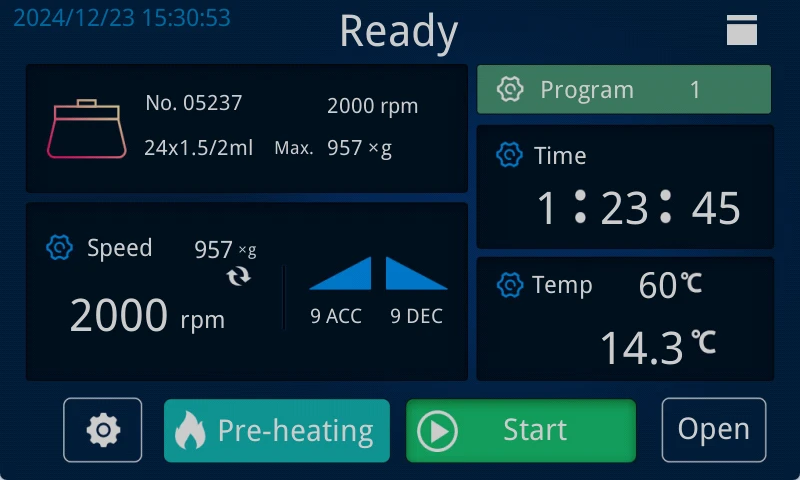
Figure 1
(1) The touch LCD screen displays the regular centrifugation parameter setting interface (see Figure 2).
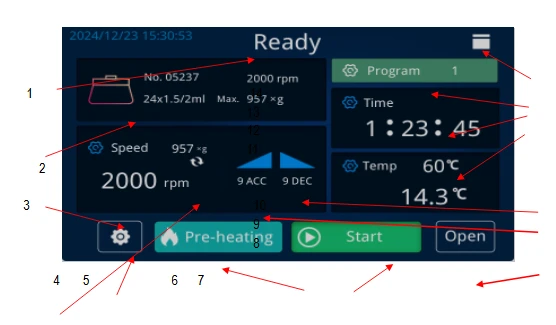
Figure 2
1. Run Status 2. Rotor Number Display Area 3. Speed and Centrifugal Force Display Area 4. Speed and Centrifugal Force Toggle Button 5. Instrument Settings Button 6. Preheat Button 7. Start Button 8. Open Door Button
9. Speed Up Button 10. Speed Down Button 11. Temperature Display Area
12. Time Display Area 13. Program Button 14. Door Lock Status Indicator
(a) Rotor Number Display Area
Click on the rotor number area to open the rotor number parameter window (see Figure 3). Use the < > buttons on the screen to select the desired rotor number, then press Confirm to select and exit the rotor number selection.
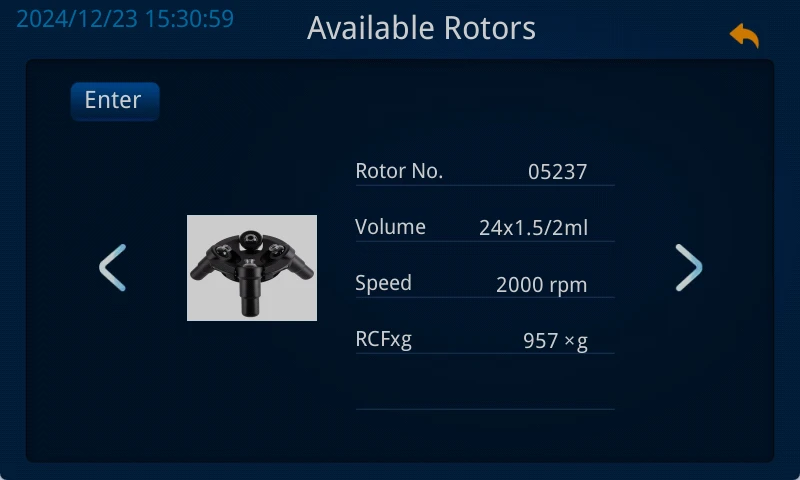
Figure 3
(b) Speed and Centrifugal Force Display Area
Press the Speed and Centrifugal Force Toggle Button to switch between displaying the set speed and the centrifugal force. In Figure 2, the speed display is shown. Click on the speed and centrifugal force display area to open the speed setting window (see Figure 4). Enter the desired speed parameter value and press the return arrow to exit the numeric keypad window. The entered value will be set as the speed parameter. Press "Esc" to directly exit without saving any input values. The entered value must be within the valid range; otherwise, the input will be invalid. The corresponding centrifugal force value will automatically adjust based on the speed parameter.
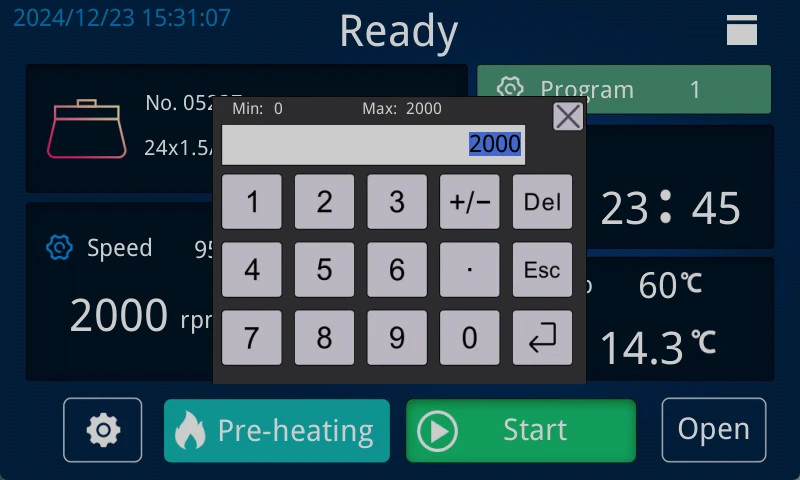
(c) Time Display Area
The maximum time displayed is 99h 59m 59s. Press the front part to open the clock setting window, press the middle part to open the minute setting window, and press the end part to open the second setting window. The setting method is the same as for setting the speed.
(d) Speed Up/Down Display Area
- Press the "Speed Up" button to open the speed-up setting window. The speed-up rate has 10 levels (0-19), with higher numbers corresponding to faster acceleration.
- Press the "Speed Down" button to open the deceleration setting window. The deceleration rate also has 10 levels (0-19), with higher numbers corresponding to faster deceleration. The "0" setting is for free braking.
Caution: For light loads, choose shorter time settings at higher levels, and for heavier loads, use longer time settings at lower levels. Setting acceleration or deceleration too quickly may damage the flexible drive shaft.
(e) Program Number Display Window
There are 100 program numbers available. After setting the rotor number, speed, time, acceleration/deceleration, and other parameters, press the "mode" button to open the program number setting window (see Figure 5). Select the appropriate program number and press the "Save" button to store the parameters under that program number. In the future, you can directly call up the parameters stored under that preset program number.
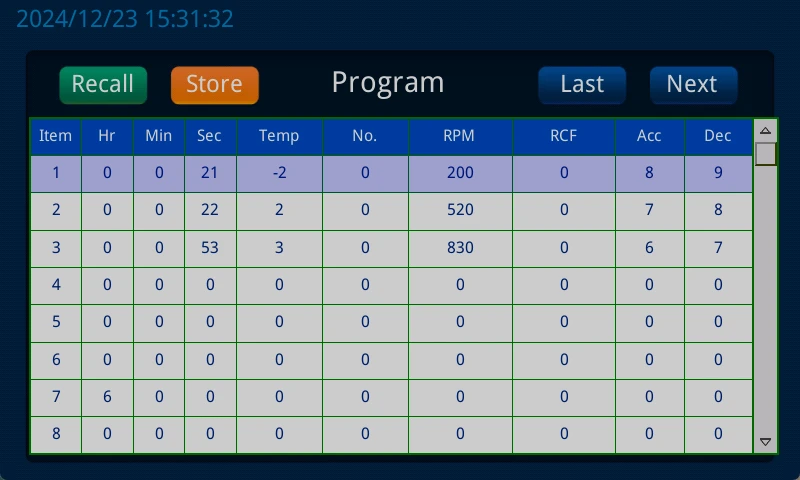
Figure 5
6. Start Operation
After setting the parameters, press the Start button. The LCD screen will switch to the regular centrifuge operation interface (see Figure 6), and the machine will begin operating according to the set parameters.
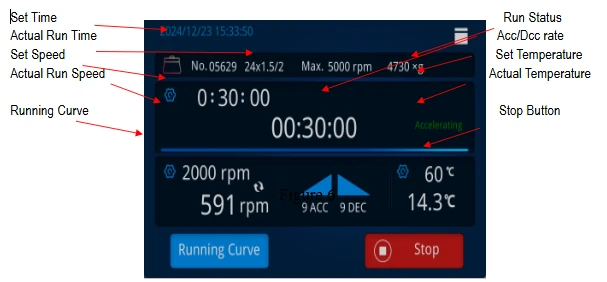
Caution: During operation, the operator should not lean on the instrument, and non-operating personnel should not remain within the safety space.
7.Stop
During operation, when the centrifuge time counts down to zero, the machine will switch to deceleration mode, and the red indicator light will turn on. When the machine emits a shutdown sound signal (indicating the rotor speed is ≤ 2m/s), press the Open Door button, the door lock will release, and the door can be opened.
If the machine needs to be stopped during operation, press the "Stop" button. The machine will follow the above procedure to shut down.
Caution: Do not open the door lock manually before the rotor has slowed down to a safe speed. Never attempt to force the rotor to stop by hand, as this can lead to injury or accidents.
7. Other Functions
7.1 System Settings
Press the Instrument Settings button to open the settings dialog box (see Figure 7). From here, you can perform system settings, adjust parameters, configure factory settings, and view operation records and version information.
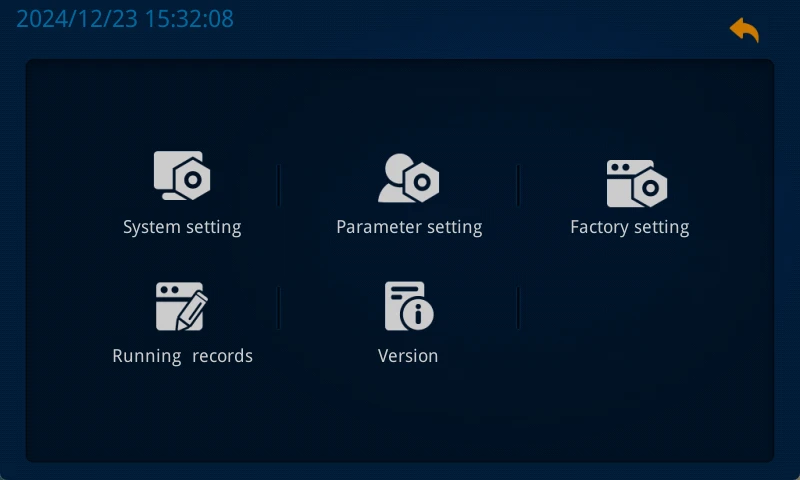
Figure 7
Press the "System Settings" button to open the dialog box shown in Figure 8, where you can adjust the following settings:
- Screen Brightness
- Sound
- Language Selection
- System Date and Time
After making the desired adjustments, click Save and Exit.
Press the "Parameter Settings" button to open the dialog box shown in Figure 9, where you can configure:
- Compressor Operation Mode
- Temperature Compensation Value
- Door Closing Sensitivity
These three parameters do not require adjustment for this model.
You can also set the imbalance offset value to adjust the imbalance sensitivity and choose whether the door should automatically open after the machine stops.

Figure 8
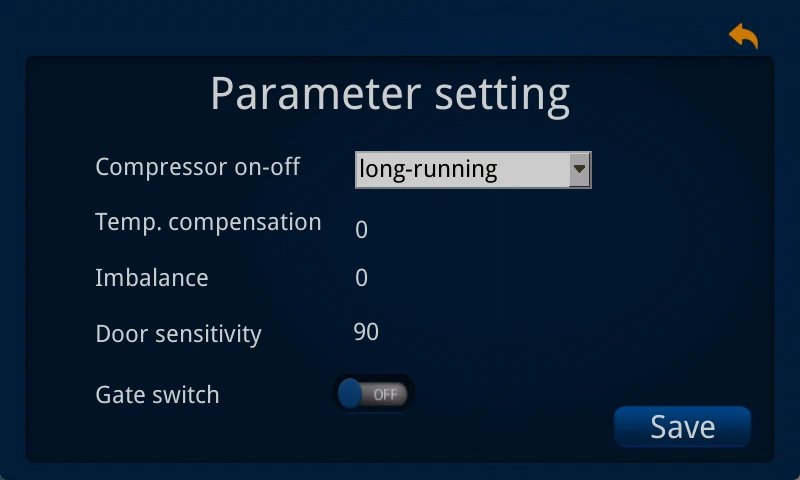
Figure 9
Press the "Factory Parameter Settings button" to open the password dialog box. After-sales maintenance personnel will need to enter a password to access these settings.
Press the Operation Records button to open the dialog box shown in Figure 10, where users can view:
- The number of times the instrument has operated
- Total operating time
- Number of door lock cycles
You can also use the Operation Log button to view detailed operational data of the instrument, as shown in Figure 12.
Press the "Version Information" button to view the instrument's information and data, as shown in Figure 11.
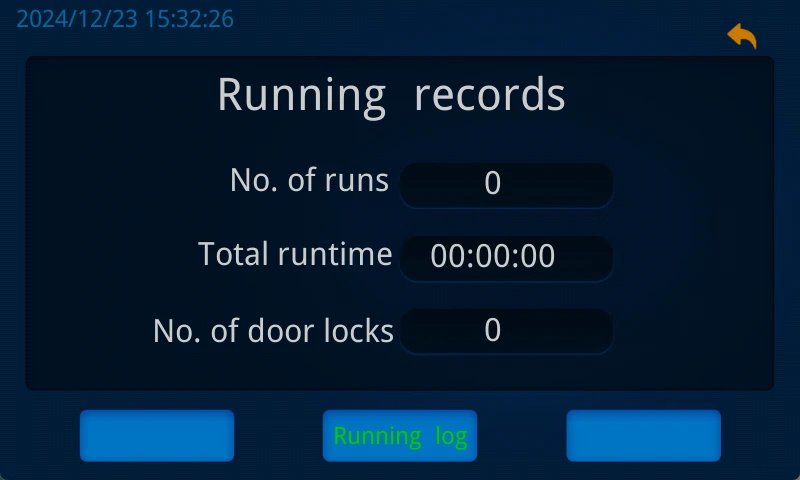
Figure 10
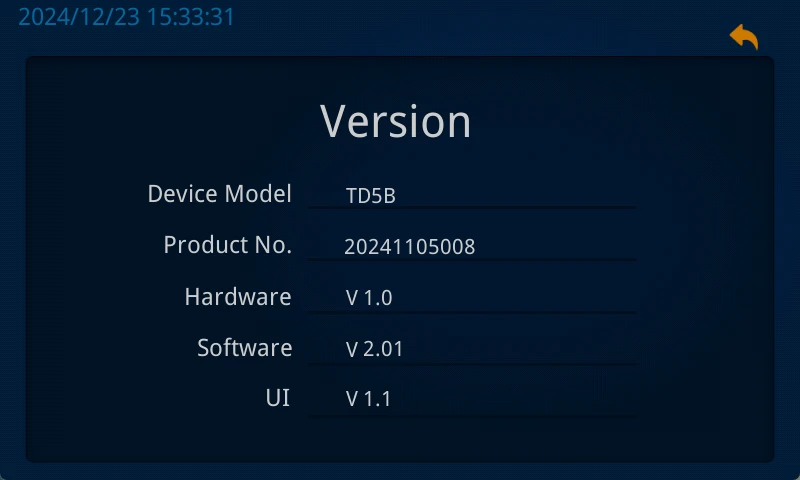
Figure 11
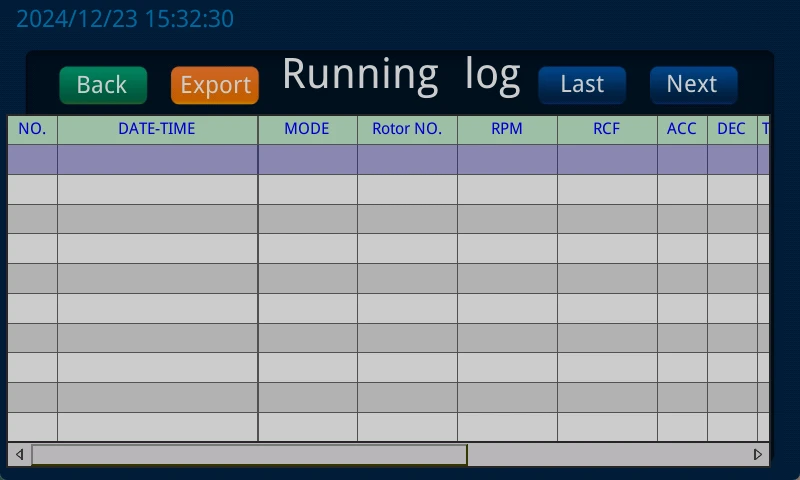
Figure 12
7.2 Protection Functions
(1) Door Cover Protection
a. If the door cover is not properly closed, pressing the "Start" button will prevent the machine from operating, and a red alarm message box will pop up.
b. For your safety, during operation, pressing the "Open" button will not release the door lock, and the door cannot be opened. Only after the machine stops and the rotor speed drops to a safe speed (≤2 m/s), can the Open Door button be pressed to open the door.
(2) Overspeed Protection
If the machine exceeds the set speed by more than 500 r/min during operation, it will automatically cut off the motor power and stop. The display will show E-8.
(3) Over-temperature Protection
For specimens with special temperature requirements, the machine has over-temperature protection. If the set protection temperature is reached, the machine will automatically cut off the motor power and stop. The display will show E-4.
(4) Temperature Measurement Fault Protection
If the temperature sensor malfunctions, the machine will automatically cut off the motor power and stop. The display will show E-5.
(5) Inverter Fault Protection
If there is a fault with the inverter, the machine will automatically cut off the motor power and stop. The display will show E-6.
(6) Speed Sensor Fault Protection
If the speed sensor malfunctions, the machine will automatically cut off the motor power and stop. The display will show E-7.
(7) Inverter Communication System Fault Protection
If there is a fault in the inverter communication system, the machine will automatically cut off the motor power and stop. The display will show E-9.
7.3 Protection for Samples During Power Failure
If the instrument cannot open the door due to a power outage or other reasons, and the Open Door button is unresponsive, you can use the included hex wrench (provided with the machine) to unscrew the door lock by turning in the direction indicated on the label on the right side of the instrument.
Note: Do not force the door open before the rotor stops. Never attempt to stop the rotor manually, as this could lead to injury.
7.4 Changing Parameters During Operation
During operation, except for the rotor number, all other parameters can be changed at any time. The machine will continue to operate based on the updated parameters.
7.5 Memory Function
After the machine stops, when it is used again, the display window will show the parameters from the last run.
8. Trouble-shooting service
Malfunction | Display | Cause | Approach |
Can't Start | Unconnected power | Connect power | |
E-1 | The door not closed | Close door well | |
E-6 | Inverter Operation Fault | contact our company | |
Excessive Vibration Shutdown | E-2 | Imbalance in Rotor Cup Weight | Reweigh the samples, allowing a maximum difference of ≤2g |
Frame Not Receiving Even Force | Adjust the machine feet to ensure even distribution of force | ||
Bent Drive Shaft | Contact our company to replace the drive shaft | ||
Temperature measurement failure | E-5 | Temperature measuring device is damaged | Contact factory directly |
Display window has no display | Switch damage | Change Switch | |
Rotor Overspeed Shutdown | E-7 | Microcomputer Control Fault | Contact our company for repair |
Speed Sensor Damage | Contact our company to replace the sensor | ||
Setting Error | E-9 | Microcomputer communication system fault | Contact factory directly |
Parameter Setting Error | Correctly set the parameters |
9. Other Precautions
1. The centrifuge motor is a brushless frequency conversion motor, so there is no need to replace the carbon brushes.
2. After each use, clean the centrifuge chamber and rotor with a dry cloth. When not in use, place a desiccant inside the chamber. If the machine is not used for a long time, remove the rotor from the shaft and store it in a dry, ventilated place.
3. If there is an electronic circuit fault, do not attempt repairs by non-professionals to avoid losing speed control.
4. Before each use, check for any fine cracks in the rotor. If cracks are found, stop use immediately to prevent rupture and equipment damage.
5. Do not use rotors with severe corrosion pits.
6. Do not use rotors that have exceeded their service life. The service life of aluminum rotors is 5 years, with a maximum of 3000 cycles or 2000 hours of cumulative use. Once any of these limits are reached, the rotor's service life has expired.
7. If the instrument is not used for a long period or is being repaired, disconnect the main power plug to prevent damage to electrical components or injury to repair personnel.
8. Do not open the door lock manually before the rotor has stopped moving. Never force the rotor to stop manually, as this could result in injury.
9. In the event of rotor damage, the allowed distance for movement is 30 cm. Do not place any hazardous materials within 30 cm of the instrument.
10. When the instrument is in operation, operators should not lean on the machine, and non-operators should not stay within the safety space.
10. Warranty Policy
1. We have one -year warranty on our products.
2. After the machine is installed, our professional technician will file it and keep track of the usage of the machine.
3. We will reply to our customers within 24 hours.
4. If the machine is under proper use, in case there is quality issues within the one-year warranty time, we will be responsible for it. Caution: If the operator doesn't operate the machine properly according to the user manual which cause damage or quality issue to the machine, we will not be responsible for it.
5. We only charge for the accessories on repairing the machine beyond the one-year warranty time.