
Get Quote ▼
Cooled Incubator BICL-6003
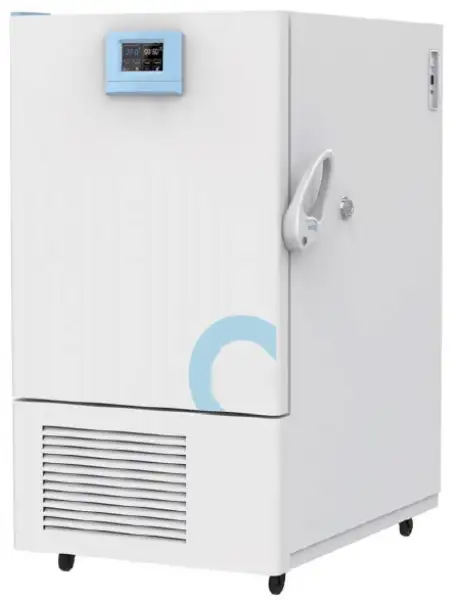
- Intelligent:
- It provides two options: colorful touch screen controller and LCD controller. It is easy to operate. (Professional type LCD controller)
- With preset power on, standby and shutdown functions.
- Parameters such as multi-stage temperature, circulating wind speed, time and heating rate can be set and programmed at the same time, simplifying the complicated test process and realizing automatic control and operation.
 Get Quote
Specifications
| Model | BICL-6003 |
| Type | Touch screen |
| Capacity (L) | 120L |
| Temp Range | -10 - 80°C |
| Display Resolution | 0.1°C |
| Uniformity | ±1.0°C |
| Timing Range | 1 - 5999mins |
| Max number of shelves | 3(14) |
| Max load per shelf | 20Kg |
| NW | 100Kg |
| Interior Dimension WxDxH (mm) | 500x400x600 |
| Exterior Dimension WxDxH (mm) | 645x690x1150 |
| Electrical Requirement | AC220V/50Hz |
| Power Consumption | 1500W |
| UV lamp | option |
| Packing Dimension | 83*78*136 |
| CBM | - |
| Net Weight | - |
| Gross weight | - |
Features
It provides two options: colorful touch screen controller and LCD controller. It is easy to operate. (Professional type LCD controller)
With preset power on, standby and shutdown functions.
Parameters such as multi-stage temperature, circulating wind speed, time and heating rate can be set and programmed at the same time, simplifying the complicated test process and realizing automatic control and operation.
Specialization:
Tested and manufactured using the international DlN-12880-2007 standard.
Provide professional temperature control, high temperature control accuracy and small temperature uniformity error.
The sample can be viewed through the internal glass door without affecting the temperature inside the box (option)
Stackable to save lab space.
Flexible shelf design for efficient use of interior space.
Safety:
Protection of equipment: The second set of temperature limit alarm system conforms to international standards. When the heating is out of control or exceeds the maximum limit temperature, the heating is automatically cut off, and the sound and light alarm reminds the operator. Ensure that the equipment operates safely without accidents.
Protection of key components: The key electrical components are equipped with over-current, over-temperature, overload and other safety protection to prevent accidental equipment.
Protection of the sample: When the temperature inside the box is higher or lower than the set temperature, the alarm will start to cut off the heater, and the sound and light will remind the operator to protect the sample from normal test without accident.
Protection for users: The cabinet and door are specially insulated to make the surface temperature of the cabinet low, ensuring the operator's safety and no accidents.
Provide fault information: When the device fails, the display will display fault information to ensure that the fault information is clear at a glance.
Humanized design:
With casters, flexible and convenient to move.
With reservation and timing functions, there is no need to wait, which effectively improves the efficiency of the experiment.
Available in Chinese and English menus to meet different language needs, with °C / °F conversion.
Safety:
Protection on instruments: Comply international standard secondary temp limiting alarm system. When the heating is out of control or exceeds the maximum limit temperature, the heating is automatically cut off with sound and light alarm, ensure operating is safe without any accident.
Protection on key components: Key components are equipped with over-current, over-temperature, overload and other safety protection to prevent accident.
Protection on samples: When the temperature inside the box is higher or lower than the set temperature, the alarm will start to cut off the heater, with sound and light alarm to remind the operator to protect the sample from normal test without accident.
Protection on operator: The cabinet and door are specially insulated to make the surface temperature of the cabinet low, ensuring the operator's safety and no accidents.
Breakdown message provided: When the instrument breakdown, the message will shown on the screen to help operator clearly check.
Convenient data processing:
The touch screen type standard with a USB interface, which can record the change status of the temperature parameters. The LCD screen is option for USB interface.
It can be equipped with RS232 data interface, which can realize remote control of the machine through software (option).
RS-232 and USB can be selected as one of them.
Precise temperature control:
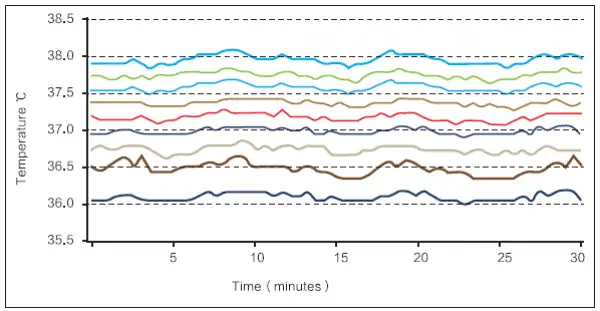
The uniformity of the temperature inside the incubator chamber is ≤±10 degree , so that all samples are heated evenly.
Note: The stability and uniformity are the result under steady state.
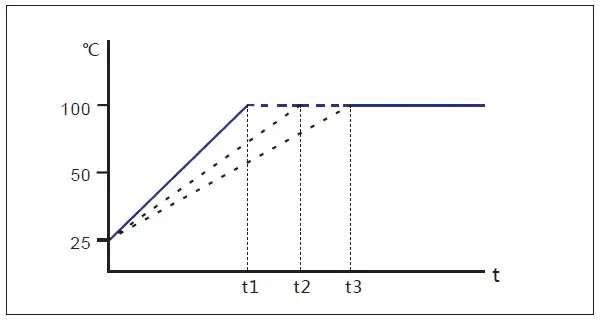
Program control mode, linear temperature rise control.
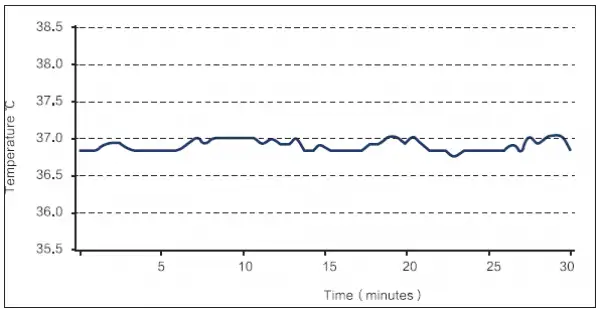
Temperature fluctuation inside the incubator chamber is ±0.2 degree, which ensures the stability of the experiment.
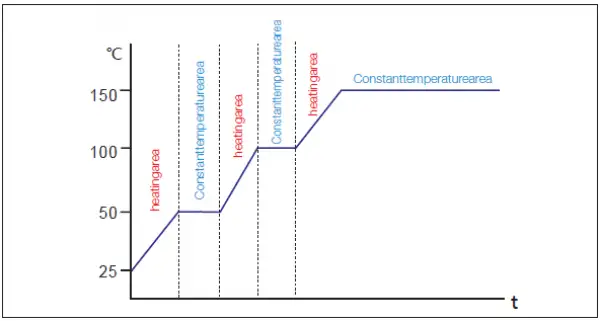
Program control mode, Step heating control.
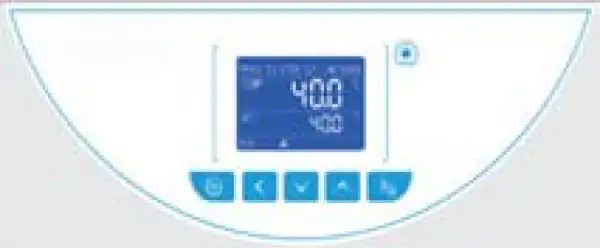
Professional LCD Controller
Intelligent program control with high brightness LCD screen, button operation and real-time display of parameters.
Quick setting of temperature, time and other parameters can be carried out.
It has the function of program setting. It can be programmed in 7segments, 63 steps, 9 steps and 1-99 hours and 59 minutes per segment.
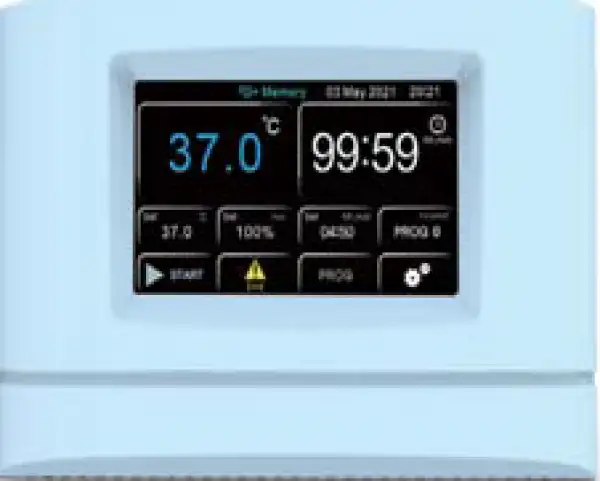
Advanced Color Intelligent Touch Screen Control
5.0 inch touch screen, intelligent touch control, real-time display of parameters, simple and convenient operation.
Quick setting of temperature, time and other parameters can be carried out. It has the function of program setting.
It can be programmed in 7 segments, 63 steps, 9 steps and 1-99 hours and 59 minutes per segment.
With touch screen automatic locking function to prevent non-related personnel from disoperation.

Professional duct design:
With a unique duct design, the use of large impeller fans, fast temperature rise and fall, stable temperature control, good temperature uniformity.
The circulating fan has adjustable speed, middle and low grades, so as to avoid the volatilization of samples due to excessive air flow during the test.
Famous brand fan, high efficiency, low noise, energy saving and environmental protection.
Stainless steel inner liner:
304 stainless steel, mirror polishing, strong anti-corruption ability.
Large arc angle design, no dead angle, easy cleaning and maintenance.
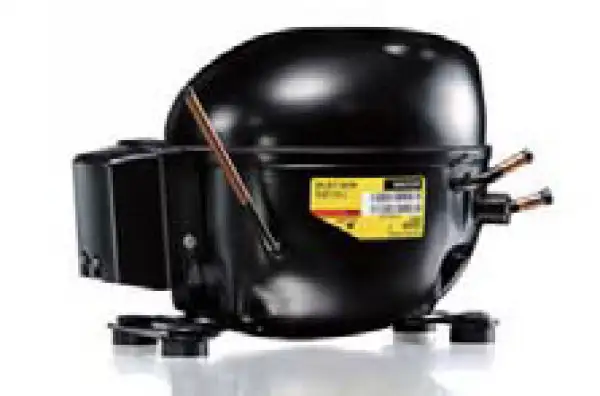
Refrigeration system:
International brand compressors, with high refrigeration efficiency and low noise, shorten cooling time by 40% compared with traditional cryogenic equipment, save energy and protect environment.
Minimum temperature up to - 10 , with refrigeration and heating functions.
Automatic switching of refrigeration and heating, high control accuracy and fast temperature stability.
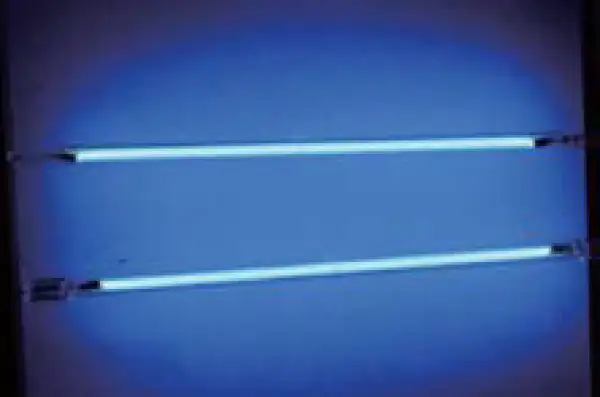
Ultraviolet sterilization system (option)
Ultraviolet lamp is located on the upper wall of the box body. It can disinfect the box body regularly and kill the plankton bacteria in the circulating air of the box body effectively so as to prevent the pollution during cell culture.
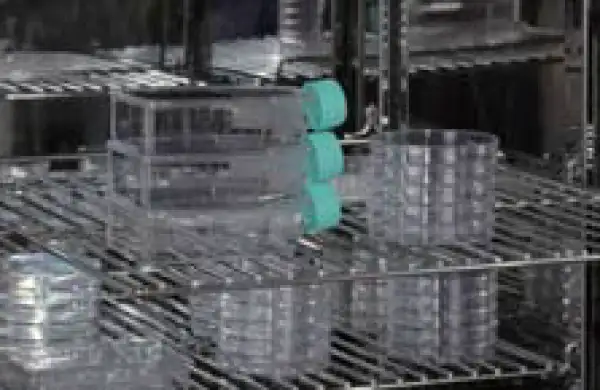
No overturning system:
Wire shelves with no overturning system to always operate safely.
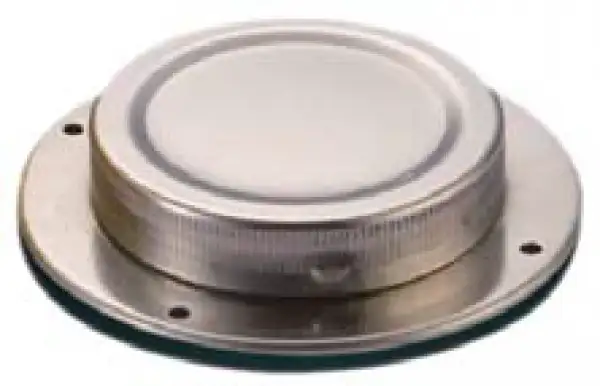
Reserved test hole:
External detection sensor can real-time detect the temperature inside the box through the test hole to ensure that the temperature inside the box is accurate and reliable.
Operating Manuals
 Download Manual (PDF)
1. Working principle
2.Scope of application
3.Definition of Terms
4.Precautions
4.1 Use environment requirements
4.2 Precautions for use
5. Structure and composition
5.1 Host structure (this picture is for reference only)
5.2 Structure function overview
6.Performance description
7. Technical Parameters.
8. Instructions
8.1 Device installation
8.2 Steps
8.4 Operation precautions
9. Cleaning and maintenance
10. Troubleshooting Guide
11.Packing list
1. Working principle
The low-temperature incubator accurately controls the temperature through a PID temperature controller, and uses a Pt100 high-precision temperature sensor to ensure that the temperature in the box is accurate, stable, and uniform. Adopting high-power fan and air duct structure design, the air flow is uniform and controllable, the temperature fluctuation is small, and the air flow is stable. With compressor refrigeration and electric heating tube heating, refrigeration and heating are automatically switched, so that the heating and cooling speed is faster, the temperature stabilization time is short, and the control accuracy is high. It can provide storage of culture media, serum, medicines, microbial cultivation, environmental testing, etc. It is an ideal constant temperature equipment for scientific research institutions such as environmental protection, sanitation and epidemic prevention, drug inspection, farming and livestock, and aquatic products.
2.Scope of application
The temperature control range of the incubator is -10~80°C. It can provide high temperature culture environment and low temperature environment. It is an ideal experimental equipment for microbial culture, BOD test culture and other experiments. It is widely used in the storage of culture media, serum, and medicines. Microbial cultivation, environmental testing, etc., are ideal constant temperature equipment for scientific research institutions such as environmental protection, sanitation and epidemic prevention, drug inspection, agriculture and livestock, and aquatic products.
3.Definition of Terms
1)Temperature range: refers to the accurate and stable temperature range that can be provided and used in the box.
2)Temperature uniformity: refers to the difference between the temperature at different temperature monitoring points in the box and the average temperature in the box, "±" indicates the range of upward and downward fluctuations.
3)Temperature fluctuation: refers to the range of fluctuations in the center temperature of the box at different times, "±" means the range of upward and downward fluctuations.
Box volume: refers to the effective volume formed by the size of the tank inside the box.
4.Precautions
4.1 Use environment requirements
- Indoor use.
- The ambient temperature is 5°C~35°C.
- The relative humidity of the environment ≤80%.
- The atmospheric pressure is 80kPa~106 kPa.
- No direct sunlight or direct radiation from other pyrogens.
- The pollution level is level 2, and there is no explosive gas, high-concentration dust or corrosive gas around.
- There is no strong vibration and air current around.
4.2 Precautions for use
4.2.1 Safety warning 
Danger !
The improper use of this unit may cause property damage and/or personnel injury.
1. This product must be earthed reliably and kept far away from electromagnetic interference source(Zero line or neutral line should never be used as earth line.)
2. Make sure the voltage and frequency of power meet the requirements of the product.
3. The product should be connected to a separate power supply outlet and both the plug and outlet are earthed properly.
4. It is not allowed to pull off or insert the power plug wantonly without turning off the power switch while the product is in operation.
5. It is not permissible to lengthen or shorten the power line cable.
6.The unit should have routine inspections and should be serviced by a qualified service technician when needed.
Warning!
! Caution(It may cause serious loss in property or injuries and deaths) 1)Operation shall be done only after the directions for use are read and understood fully. 2)As 304 SS inner container is not acid-resistant, anti-corrosive measures should be adopted and acidic medium should never be used in the incubator!
The power line should never be drawn directly when pulling off the plug. 4)In one of the following cases, the power plug must be pulled off.
- Replacement of fuse.
- Under inspection and repair when the product fails.
- Suspension from use for a long time.
- In movement.
Caution!
It may affect the service life, resulting in its inability to work regularly.
- When carrying the product or handling the product, the dip angle shouldn't be larger than 45°, in order to avoid damage the cooling system.
- The product shall be mounted on a solid and firm plane, keeping it horizontal.
- Certain space shall be left around the product.
- The product must be used under certain conditions.
-Never open/ close the box door with a strong force, otherwise the door will fall away and the product will injure, causing casualties.
- When the product stop using for a long time, it should be dehumidified regularly to avoid
damage relevant devices.
5. Structure and composition
5.1 Host structure (this picture is for reference only)
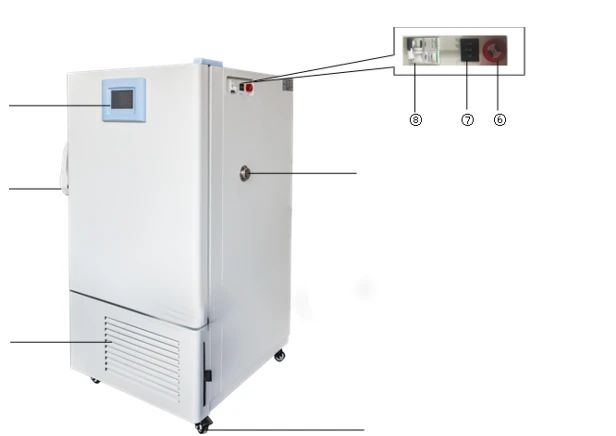
Figure 1.
1.Smart touch screen
2.Heat sink
3. Test hole
4. Door handle
5. Product identification
6. Sound and Light alarm (optional)
7. Independent temperature limiting controller
8. Power
5.2 Structure function overview
The Cooled Incubator series low-temperature incubator is composed of a cabinet, a temperature control system, a heating tube, a blast system, a refrigeration system, etc. The cabinet is made of high-quality steel plate, and the surface is sprayed with plastic. The inner tank is made of high-quality galvanized sheet or mirror stainless steel. It is composed of plates (for users to choose), and the heat insulation layer is filled with ultra-fine glass wool.
The main component of the temperature control system is the temperature control instrument, which is a microcomputer intelligent controller composed of a single-chip microcomputer and peripheral circuits with a dual-row LED four-digit display. It uses Pt100 platinum resistance as the temperature sensing element, and uses PID adjustment to control the heating system and control the temperature. The instrument also has functions such as timing control, temperature control error correction, deviation alarm protection and so on. This series of products have the advantages of high temperature control accuracy, small overshoot, small fluctuation and deviation over-temperature protection. In addition, an independent over-temperature protection system can be added according to the needs of users, which can improve the safety performance of the product.
5.3 Controller description LCD controller 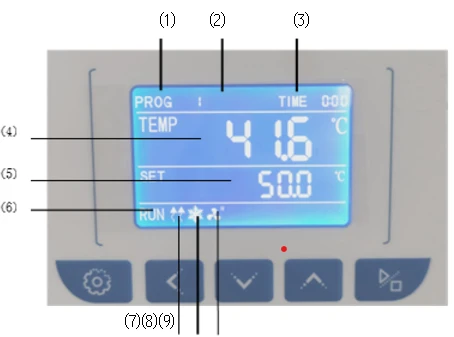
Figure 2.
Indicator light description
1) PROG area: Display program working group or setting group.
2) STEP area: Display the number of segments or parameter codes of the work.
3)TIME area: Display running time or parameter value.
4)PV area: Display measured temperature.
5)SV area: Display set temperature.
6) RUN: On when working, off when shutting down.
7) Heating lamp: on when heating output; off without heating.
8) Refrigeration lamp: flashes with delay, on when there is refrigeration output; off when there is no refrigeration output.
9)Fan indicator light: on when there is fan output.
Key Description
 Setting key: long press the setting key, and when the number of the next segment of PROG flashes, press the setting key to enter the modification of the setting value.
Press the setting key and the shift key at the same time to enter the internal parameter setting, in the parameter setting state, long press the setting key for m  ore than 2 seconds to exit.
 Shift key: used to shift the set value, internal parameters and view the ambient temperature.
 Decrease key: used to modify the set value, various parameters, or start/stop auto-tuning.
Increase key: used to modify the set value, internal parameter, or view the remaining period.
 Start/stop button: Press for 2 seconds to run or stop the controller.
Touch screen function introduction
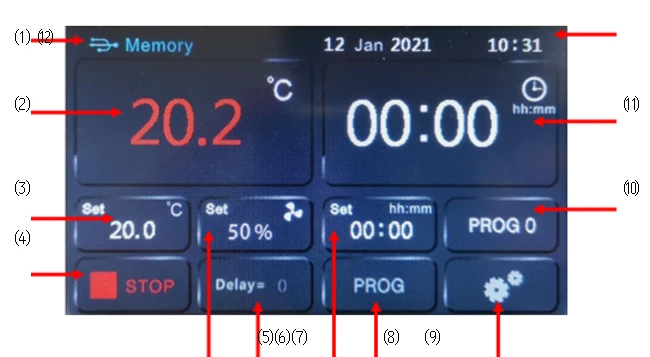
Figure 3.
⑴: USB symbol (indicating that the U disk is connected)
Temperature measurement display area.
⑶: Temperature setting area.
⑷: Run/stop button.
⑸: The speed setting or status display window of the circulating fan in the box.
⑹: Display of scheduled boot time and display of program cycle times.
⑺: Run time setting.
⑻: Program content editing entrance.
⑼: Parameter setting entrance.
⑽: Display of running program number selection entry, current running program group number and program step number.
⑾: Running time display (countdown).
⑿: System date and time display.
6.Performance description
Professional LCD controller (L series)
- Intelligent program control with high-brightness display LCD screen, button operation, real-time display of parameters.
- Quickly set parameters such as temperature and time.
- With program setting function, 7 sections can be preset, a total of 63 steps are programmable, each section has 9 steps, and the setting time of each section is 1-99 hours and 59 minutes.
Color smart touch screen control
- Adopt 5.0-inch large touch screen, intelligent touch screen control, real-time display of parameters, simple and convenient operation.
- Quickly set parameters such as temperature and time.
- With program setting function, 7 sections can be preset, a total of 63 steps are programmable, each section has 9 steps, and the setting time of each section is 1-99 hours and 59 minutes.
- With touch screen automatic lock function to prevent misoperation by non-related personnel. Humanized design
- With movable casters, flexible and convenient to move.
- With appointment and timing functions, there is no need to wait, which effectively improves the efficiency of the experiment.
- (Color smart touch screen) With optional Chinese and English menus, it can meet the needs of different languages, and the temperature can be converted from °C/℉.
Security function
- Protection of equipment: The second set of temperature limit alarm system in line with international standards, when the heating is out of control or exceeds the limit temperature, the heating will be automatically cut off, and a sound and light alarm will alert the operator.
- Protection of key components: key electrical components are equipped with safety protections such as overcurrent, overcurrent, and overload, which can prevent accidental release of equipment.
Protection of samples: When the temperature in the box is higher or lower than the set temperature, the alarm will start to cut off the heater, and the sound and light will remind the operator, which can protect the sample from normal testing without accidents.
- Protection for users: the box and door adopt a special heat insulation design to make the surface temperature of the box low, to ensure the safety of the operator and prevent accidents.
- Provide fault information: When the device fails, the display will show fault information to ensure that the fault information is clear at a glance.
Patented non-slip anti-turnover shelf design
- The shelf has an anti-tilting function to avoid loss caused by falling off when the shelf is pulled out.
- The shelf has an anti-locking function, and the shelf will be locked when it is half drawn out to avoid losses caused by the shelf directly sliding down.
Professional air duct design
- It has a unique air duct design, adopts a gale impeller fan, fast heating and cooling speed, stable temperature control, and good temperature uniformity.
- The circulating fan speed is adjustable in three levels: high, medium and low, to avoid the volatilization of samples due to excessive air volume during the test.
- Well-known brand fan, high efficiency, low noise, energy saving and environmental protection. Stainless steel liner
- 304 Stainless steel inner tank, mirror polished, strong corrosion resistance, easy to clean and maintain.
- Large arc angle design, no dead angle, easy to clean and maintain.
Cooling System
- International brand compressors have high cooling effect and low noise. Compared with traditional low-temperature equipment, the cooling time is shortened by 40%, which is energy-saving and environmentally friendly.
- The lowest temperature can reach -10°C, with cooling and heating functions at the same time.
Automatic switching between refrigeration and heating, high control accuracy, fast temperature stability.
Reserve test holes
- The external detection sensor can detect the temperature in the box in real time through the test hole to ensure that the temperature in the box is accurate and reliable.
Convenient data processing
- The touch screen is equipped with a USB interface as standard, which can record the change status of temperature parameters, and the LCD screen is equipped with a USB interface;
- Optional RS485/RS232 data interface, remote control of the machine can be realized through software (optional).
※USB interface, RS485/RS232 two options.
UV lamp sterilization system (optional)
- The ultraviolet lamp is located on the upper wall of the box body, which can regularly disinfect the inside of the box body and effectively kill the floating bacteria in the circulating air in the box body, thereby effectively preventing pollution during cell culture.
Option (L series)
Embedded printer (※ printer, USB interface, RS485/RS232 three options).
7. Technical Parameters.
Model | INC064-120A |
Capacity (L) | 120L |
Temp Range | -10 ~ 75°C |
Display Resolution | 0.1°C |
Uniformity | ±1.0°C |
Timing Range | 1 ~ 5999 mins |
Max Number of Shelves | 3 (1Φ) |
Max Load Per Shelf | 14 kg |
Net Weight (NW) | 100 kg |
Interior Dimensions (W x D x H) | 500 x 400 x 600 mm |
Exterior Dimensions (W x D x H) | 645 x 690 x 1250 mm |
Electrical Requirement | AC 220V / 50Hz |
Power Consumption | 1500 W |
UV Lamp | Optional / standard |
Note: ①All parameters are measured at an ambient temperature of 25°C. ②The external dimensions do not include external protrusions such as hinges, handles, meters, wires, etc., and the internal dimensions do not include air duct parts.
8. Instructions
8.1 Device installation
8.1.1 Preparation before use
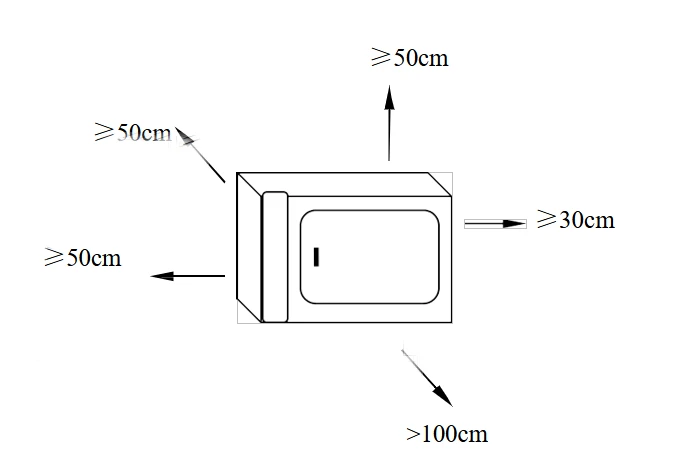
Ensure that the product use environment meets the following conditions of use:
1) Ambient temperature: 5°C~35°C. 2)
2) Relative humidity is not greater than 85%.
3) Atmospheric pressure: (86~106) kPa.
4) The altitude is not higher than 2000 meters.
5) There is no strong vibration source and strong electromagnetic field around. >100cm
6) It should be placed in a stable, level room, free of serious dust, direct sunlight, and no corrosive gas.
7) Leave enough space around the product, as shown in the upper right picture, it should not be placed under the fire alarm.
8) The power supply voltage of the product meets the description requirements of the technical parameters.
9) Place them reasonably, adjust the position and quantity of the shelves, and put in the work items. It is necessary to maintain a certain gap (>100mm) around the upper and lower sides. The weight should not be bent and deformed. 8.1.2 Device boot
1) Connect the machine to the power cord as required, and ensure that the power is effectively grounded.
2) Confirm again that the contents in the box have been taken out, and then turn on the power. 3) Parameter setting according to experimental requirements. 8.2 Steps 8.2.1 Introduction to touch screen operation interface functions (refer to "5.3 Introduction to Touch Screen Functions").
8.2 Steps
8.2.1 Introduction to touch screen operation interface functions (refer to "5.3 Introduction to Touch Screen Functions").
8.2.2 Program mode operation screen
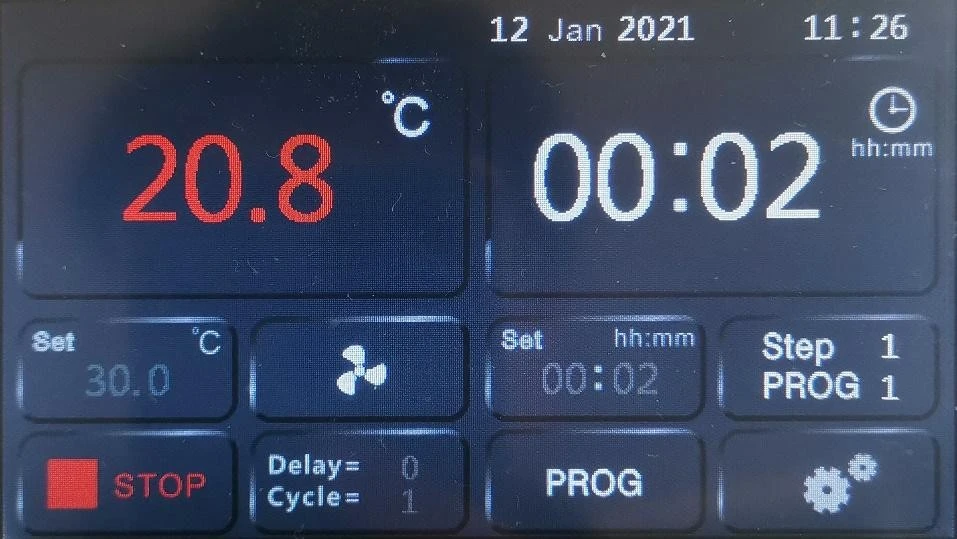
Figure 3
8.2.3 Operation mode selection
1. Ensure that the controller is in a stopped state
2. Operation steps, as shown below: Select number 1-8, which means program operation mode
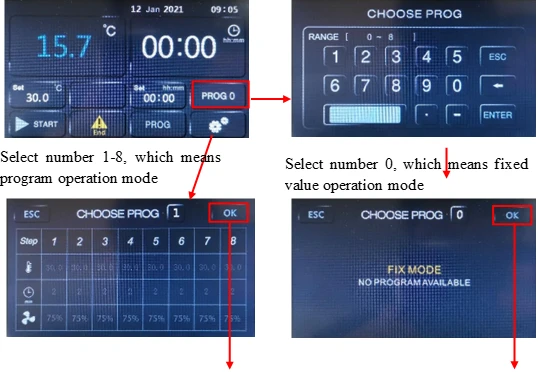
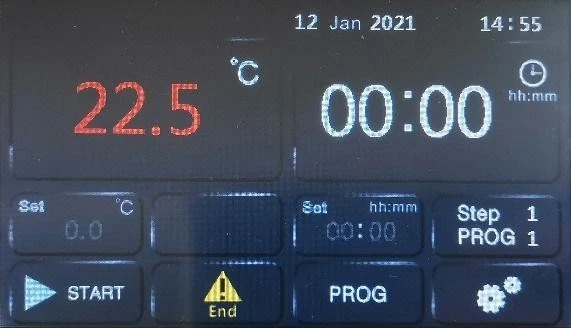
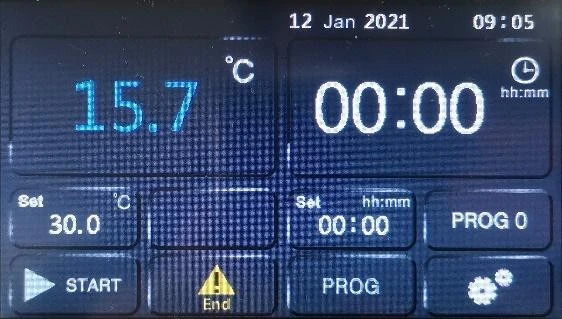
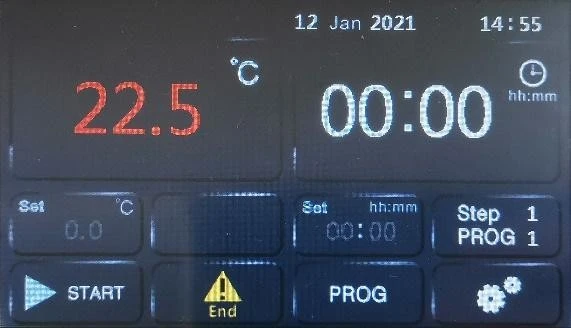
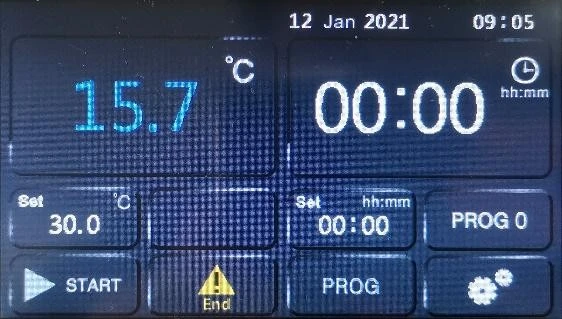 Figure 4
8.2.4 Program content editing
1. Ensure that the controller is in a stopped state.
2. The operation steps are as follows: select the program group number to be edited 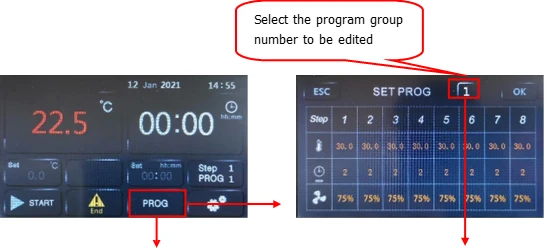
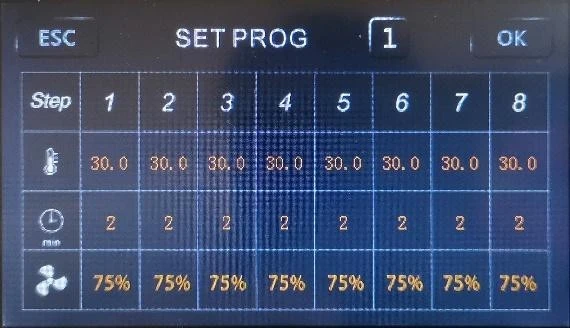
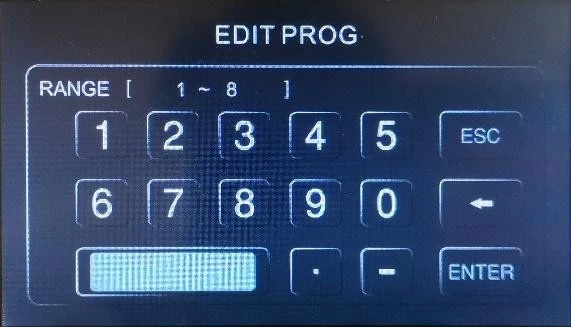
Figure 5
 Temperature setting
 Time setting
 Circulation fan setting
Setting of the number of program cycles
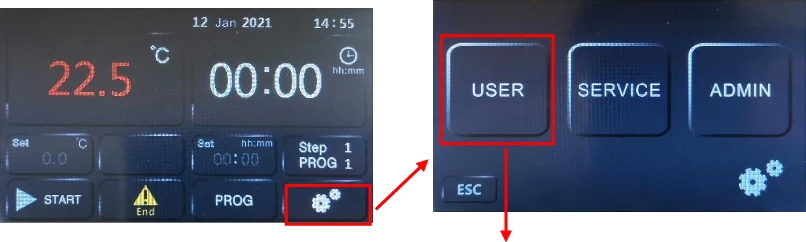
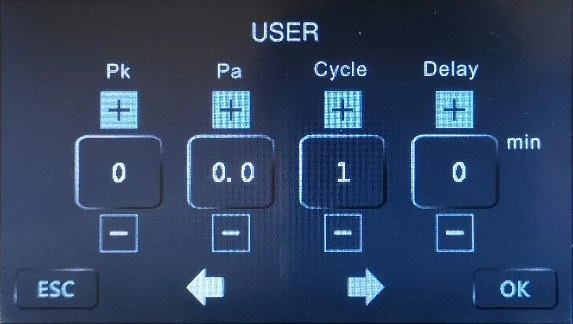
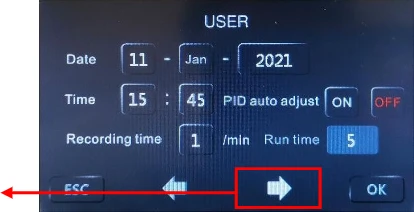
Figure 6
Cycle: The number of program cycles, 0 means infinite cycles, other numbers, the corresponding number of cycles, such as 1, if the program only runs once, the device stops. Delay: Make an appointment to set the boot time. After setting the time here, return to the main interface and click the run button to start timing. After the time is up, the device will automatically run.
Explanation: 1. This controller has 8 groups of programs, each group of 8 steps, only need to set a stable target temperature value and the time needed to stabilize. For example: using the second set of programs, 100°C, constant temperature for 2 hours, fan speed 75%, 150°C, constant temperature for 4 hours, fan speed 100%, set as shown in the figure below:
Figure 6 2.
2. This controller is a general-purpose controller. If you find that there is no fan speed setting column in the program editing, it means that you have purchased equipment that does not have the function of adjusting the speed of the circulating fan.
3. To run in the program mode, you must have the correct program content and the number of program cycles you need to effectively meet your test requirements.
8.2.5 Fixed value mode operation
1. The program number is selected as 0.
2. The operation is shown in the figure below:
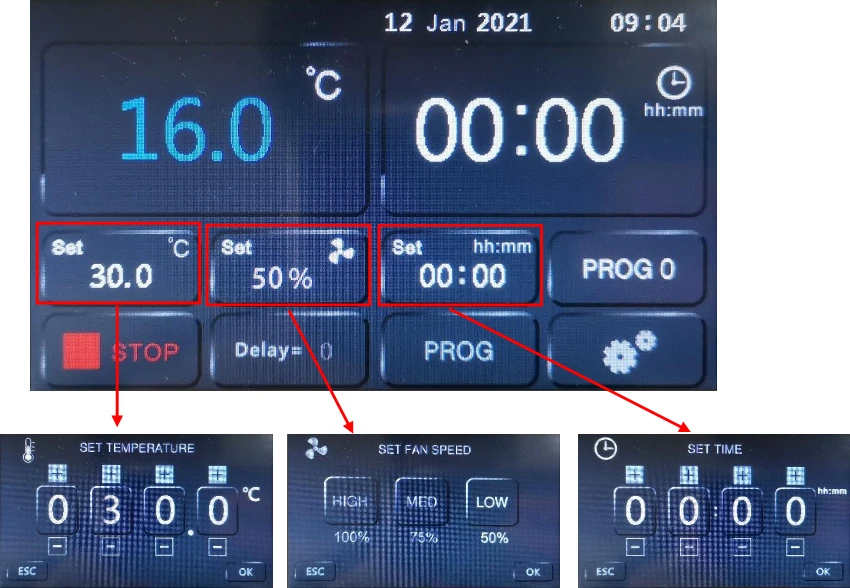
Figure 7
8.2.6. Schedule boot settings
1. Ensure that the controller is in a stopped state.
2. Ensure that the system time is set correctly.
3. See the third step of program content editing: setting the number of program cycles
4. After the delay time is set, return to the main interface, click the run button, the main interface is displayed as follows
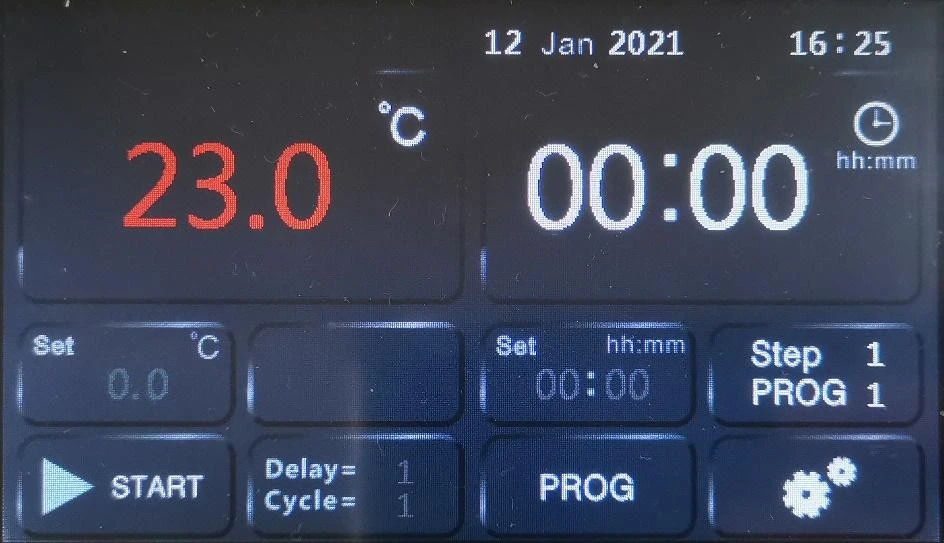
Figure 8
Note: 1. Delay = 1 means the device will start to run after a delay of 1 minute. 2. After the scheduled operation ends, the scheduled start-up delay time is reset to 0. If you want to schedule the start-up operation again, you need to perform the setting again.
8.2.7 LCD screen operation interface function introduction (refer to "5.3 LCD screen function introduction"
1. Programming steps
1.1 Press  set key, PROG The first digit flashes, Through
  Add key or Decrease key to select the setting group that needs to be modified: If PROG displays "1"
(indicating the first group); Second tap set key, STEP display"1" (Represents the first paragraph), Prompt to enter the parameter setting of the first section of the first group: TIME Flashing, Prompt that you can modify the running time (such as setting 02: 02 means 2 hours
and 2 minutes); Third tap set key, The SV area flashes, prompting that the set temperature can be modified.
Note: If the time of the first segment is set to 0, it will automatically become untimed fixed value control; if the time of other segments is set to 0, this segment is the end segment, and the program will end automatically when it runs to this segment.
1.2 Fourth tap set key, STEP display"2", Prompt to enter the first group of the second section of the program setting, repeat the above method to set the time and temperature of this section.
1.3 Long press Set the key or do not press the key for a long time, automatically return to the nitial interface.
2. Fan high and low speed settings
Tap Function key until the fan indicator flashes, through  Add key or
  Decrease button to select the required fan speed (H means high speed, M means medium speed, L means low speed), And tap Function key confirmation.
3. Program operation instructions
3.1 Each time you modify a parameter, you need to long press " "set key, When the number of the segment number after PROG flashes, press the set button to enter the modification of the set value, and the modification is effective after confirmation; simultaneously press the set button and the shift button to enter the internal parameter setting, and in the parameter setting state, long press the set button 2 Exit in more than seconds.
3.2 After all parameters are set,press"  " Start/stop button, wait for about 2 seconds to start running.
3.3 Users can set the required temperature and time in the number of PROG groups according to their needs, and just call out this group to run next time;
3.4 Select working group: In the shutdown state, there are two methods to select the required working group.
3.4.1 Press Set the key for 2 seconds to enter the working group setting, at this time the first digit of PROG flashes, press Add key or Reduce the key to set up the working group, press Set key to confirm and exit.
3.4.2 In the user parameter area, find the GP parameter and modify it directly.
3.5 The TIME area is displayed as the remaining time during operation.
4. Upper deviation alarm setting
The upper deviation setting is reasonable, which can protect the system from over-tolerance or out-of-control temperature control. It must be used when the product is working.
Example: If AL=50 is set when the product leaves the factory, the alarm temperature is: (set temperature value + AL value) °C.
5. Constant value control setting: If the controller only has the function of constant value control, click the SET button to set the temperature, set time, and circulating air volume respectively. If you press the SET button often or do not press any button for a long time, it will automatically return Initial interface.
6. Refrigeration function: Two modes can be selected:
a. Balance mode: ①When the set value is less than the current ambient temperature +5 degrees, the compressor is opened for a long time, and the required set temperature is balanced by heating; ②When the set temperature is less than CL, the compressor is opened for a long time, and Independent of ambient temperature
b. Switching mode: when the temperature is higher than the set temperature +CL, the refrigeration is turned on, and the refrigeration is turned off when the temperature is lower than the set temperature.
c. The ambient temperature can be queried. In the standard state, press the shift key for more than 4 seconds, the PV area flashes, and the ambient temperature is displayed.
7. Self-tuning function: If the temperature control effect is not satisfactory, please start the
self-tuning. In the standard state, press Decrease key for more than 5 seconds, the temperature setting value in the SV zone flashes, indicating that the controller enters auto-tuning. After the temperature fluctuates back and forth three times, the auto-tuning ends automatically. Get a set of new PID parameters, and the controller will control according to the new PID parameters. In auto-tuning, long press Decrease key to exit auto-tuning.
8. Function parameter table of LCD controller
1) Press hold SET key, when LCD screen displays LK=0000, input the password, and click SET key to enter the setting.
Prompting Sign | Name | Setting Range | Description | Ex-factory Value |
Pn | Work group in operation | 0~8 | For program control only. To set up the work group for operation of meters. When GP is set as 8, Group 8 is for fixed value control. | |
Cy | Number of cycle in a period | 0~99 | Special parameter for program control. When CY is 0, the meter will run between the work group all the time. When CY is not 0, the meter will shut down automatically after CY in the group. | |
dy | Appointment boot selection | 0-99::59 | 0: No appointment; for other values, after pressing the run key to start, it will automatically delay the dy time and then start the machine. | |
ut | UV time | 0-200 minute | Turn off the UV lamp after ut time, ut=0, turn off the UV lamp manually. | Optional |
uS | UV switch | 0-1 | 0: Turn off the UV light 1: Turn on the UV light. | Optional |
2) Press hold SET key, when the LCD screen displays LK=0003, input the password and click SET key to enter the setting.
tM | Setup of maxi temperature permissible by the instrument | full range | Stop heating beyond maxi temperature and give alarm. | |
Po | Boot mode | 0~2 | ①when PO =0, after open the power, the controller in a stopped state, by long press star/stop key is up and running. ②when PO =1, after open the power, the controller will be running. ③when PO =2, running from last power began to run. | |
AL | Setup of alarm | 0~100.0 | When the temperature exceeds the value of SP+AL, the alarm light is on and the alarm is output (with HOLD function). | |
Pb | Zero adjustmen (intercept) | -100.0~ 100.0 | When the zero error of the instrument is greater and the full scale error is smaller, the value should be adjusted. As a rule with Pt100 the value is seldom adjusted. | |
PK | djustment of fu scale (slope) | -1000~ 1000 S | When the zero error of the instrument is smaller and the full scale error is greater, the value |
should be adjusted. PK=4000 x (specified value - actual display value)/actual display value and as a rule with Pt100 the value is adjusted first. | ||||
PA | Onboard room temperature sensor correction | -30-30 | When there is an error between the on-board room temperature sensor and the actual situation, adjust the value. | |
2b | The second zero correction | -100-100 | When the second channel zero error is large and the full scale error is small, adjust this value. Generally, Pt100 rarely adjusts this value. | |
2K | Second channel full scale adjustment | -1000~ 1000 | When the zero error of the second channel is small and the full-scale error is large, adjust the value. PK=4000x(mercury thermometer value-display value)/display value, generally Pt100 adjust this value first. |
※ The change of each function parameter may change the control effect. If you don't press the X key within one minute, it will automatically return to the standard mode, and some function parameters may not be changed.
8.2.8. Printer function description (optional)
Wiring diagram and indicator light description:
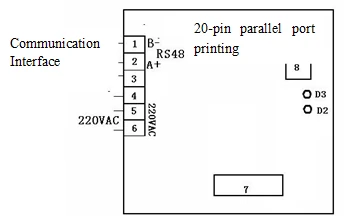
Figure 9.
Wiring instructions:
Terminal 2 is the communication interface (connected to the communication port of the instrument), terminals 5 and 6 are connected to 220V power supply, 7 is the debugging interface, and 8 is the print test button (click to print the test information).
Indicator light description:
D3,Printer online indication: Off means the printer is online, flashing means the printer is faulty or offline.
D2,Communication indication: bright means communication failure, off means communication success
Long press the setting key for more than 4 seconds to enter the LK code, adjust LK to 188, and then long press the setting key to enter the printing parameter setting:
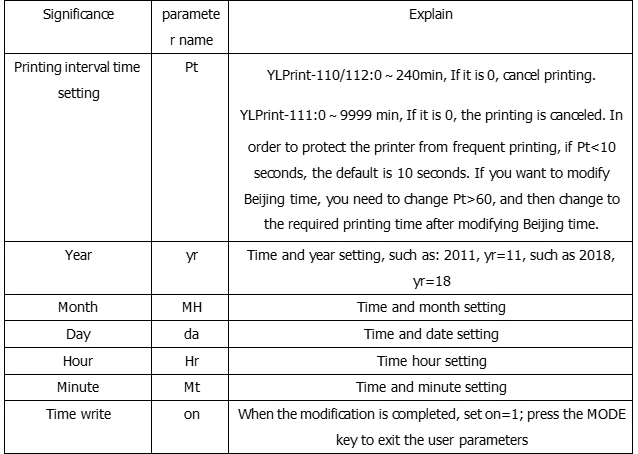
8.3 Usage of "Over-temperature Protector"
The over-temperature protector is an independent protection system. When the temperature is out of control due to the failure of the thermal controller and the room temperature of the chamber reaches the set value of limiting temperature in the over-temperature driving plate, the over-temperature protector will automatically cut off heating and alarms. (As shown in the left diagram) when the room temperature of the chamber is lower the limiting temperature value, the protecting system will be off and the meter resumes to normal. It will repeat like this till the breakdown is eliminated.
The particular operation is as follows:
1) The set value of limiting-temperature should be greater than or equivalent to (SV+AL)+(2~5)°C
2) Set the required limiting temperature as per need by using the "+" "-" buttons on the over-temperature setting plate of the penal For example: SV=37°C, AL=2, then set 42°C.
8.4 Operation precautions
1) Turn off the power after each use;
2) If it is not used for a long time, the cabinet must be cleaned inside and outside, and the plastic dust cover on the power plug must be unplugged;
3) If the storage environment has high humidity, it should be energized and heated regularly (about 1 month) for damp-removal treatment;
4) Before reuse or when the process requirements change, the temperature control accuracy should be checked;
5) In addition to the temperature setting, time setting, program setting and other parameters that can be changed, other function menu parameter adjustments need to be approved by our company's service center or operated by professionals.
9. Cleaning and maintenance
1) Routine maintenance, clean and maintain the equipment regularly, wipe the liner and shelf regularly with a dry cloth to make the liner clean and free of foreign matter;
2) Routine maintenance, regular cleaning of the outer surface, pay attention to the impact of the return to the city on the air door and test hole;
3) Long-term maintenance. If it is not used for a long time, the cabinet must be cleaned inside and outside, unplug the power plug and cover the plastic dust cover, and regularly (about 1 month) power on for damp treatment.
10. Troubleshooting Guide
Symptoms | Possible causes | Remedies |
No power after startup (pilot lamp is not on) | Power socket is not energized or plug is in poor contact. | Make it repaired. |
Chamber power line broken or plug is not inserted properly. | Make it repaired or inserted again. | |
Power switch is broken (or is not turned on) | Make it fixed by the professional personnel. | |
Fuse blown | If the fuse still burned out after the replacement and energization, you need to check if the switch, heater or temperature controller are short-circuited or leaked (insulation resistance of 0) and restart after repairing. | |
The temperature displayed abnormal on the screen | Sensor is out of order or wiring i broken (knocked off) | Pt100 is repaired or replaced. |
No temperature rise | Check if timing is set up and time i up. | Refer to the operation of timing function. |
The controller does not work (without output) | When OUT light doesn't shine or 3061 is broken, replace it. | |
Setting temperature is lower than the internal temperature | Open the door until the internal temperature is lower than the setting temperature. | |
Temperature control is inaccurate (static difference is large) | The difference between room temperature and set temperature is less than 5 degrees Celsius. | Minimum temperature under control :Ambient+5°C(9℉) |
Noise abnormal (BOF series) | The fan is broken or lack of lubricating oil | Replace fan or add lubricating oil |
Friction on rear air duct plate | Repair or add washer |
11.Packing list
Serial numb er | Category | Name | Unit | Quantity | Memo |
1 | Document | User's manual | 1 | ||
2 | Document | Packing list | 1 | ||
3 | Components | Shelf | See parameter table |